

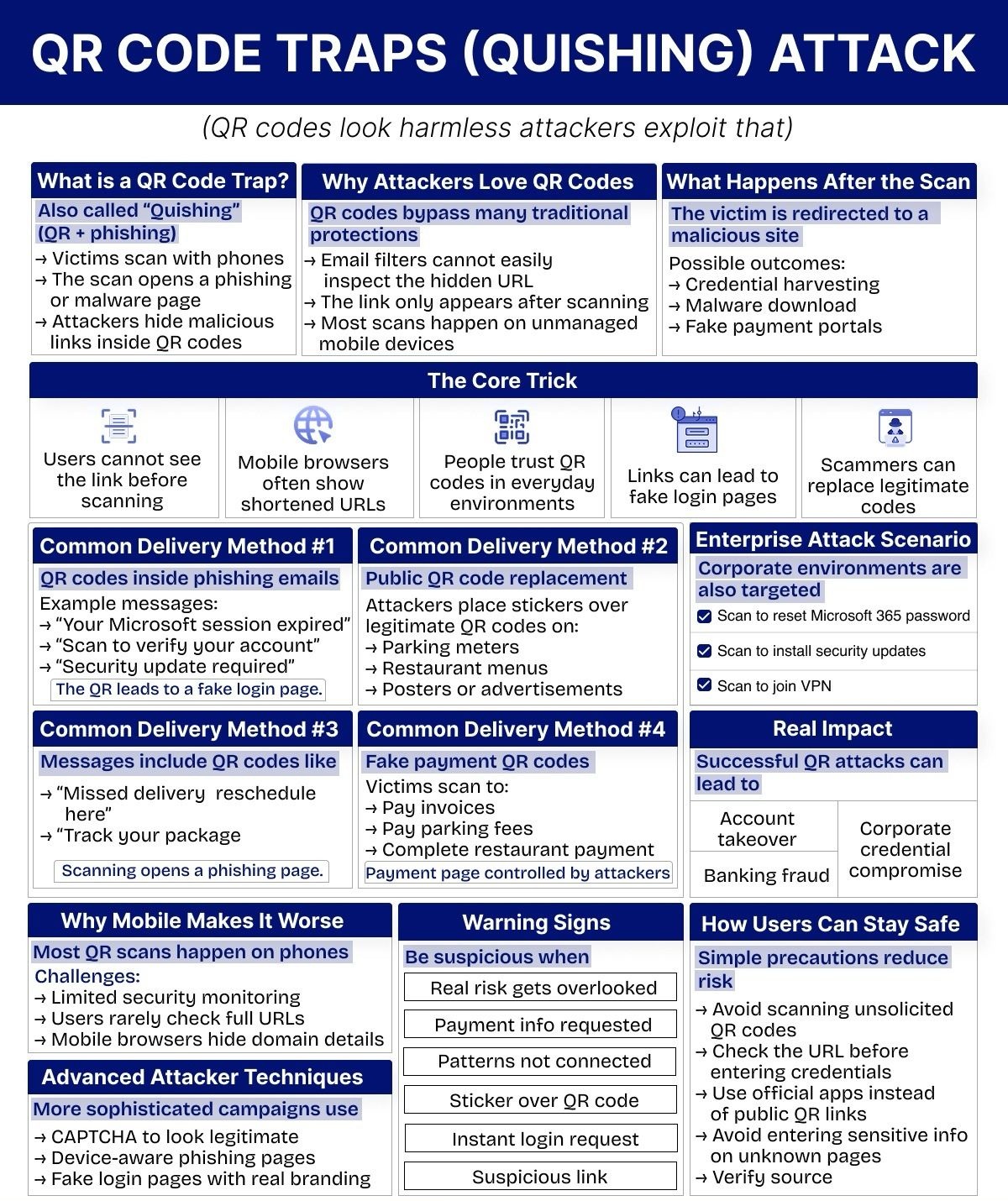
The ubiquitous QR code, once a simple bridge between the physical and digital worlds, has been weaponized. What appears to be a harmless, convenient square often conceals a sinister payload: a phishing link, a malware download, or a pathway to stolen credentials. This deceptive tactic, known as “quishing” (QR + phishing), is rapidly becoming a favorite among cybercriminals, precisely because most individuals perceive QR codes as safe and innocuous.
Attackers are no longer solely focused on breaking into systems; they’re adeptly hacking human behavior. The inherent trust placed in QR codes, coupled with the limitations of mobile device interfaces, creates a fertile ground for these traps. This comprehensive guide will delve into the mechanics of quishing, reveal why it bypasses traditional security, illustrate its common manifestations, and empower you with the knowledge to safeguard yourself and your organization from these evolving threats.
The Deceptive Simplicity of Quishing
Quishing represents a significant evolution in the phishing landscape. While traditional phishing attempts often involve suspicious links in emails or SMS messages (smishing), quishing cleverly embeds malicious intent within an image. This seemingly minor change has profound implications for cybersecurity, turning a mundane scan into a potential digital nightmare.
Defining the QR Code Trap
At its core, a QR code trap, or quishing attack, involves an attacker hiding a malicious link or command within a QR code. When a victim scans this code, typically with their smartphone, they are unknowingly redirected to a phishing site, a page designed to install malware, or a fraudulent portal engineered to harvest sensitive information. The immediate consequence of scanning a malicious QR code can range from the trivial redirection to an irritating advertisement, to the catastrophic compromise of personal or corporate accounts.
Unlike a visible URL that offers a chance for scrutiny, the QR code shrouds its destination in an opaque graphic. This lack of transparency is the cornerstone of its effectiveness as a phishing tool. The user interface of mobile browsers often exacerbates this problem, as they may only display a truncated URL or immediately initiate an action, further obscuring the true nature of the destination.
Why Attackers Love QR Codes
The allure of QR codes for cybercriminals stems from their ability to circumvent established security protocols and exploit human trust. Several key factors make them an attractive vector for attack:
Bypassing Traditional Security Protections
Email filters and other common cybersecurity defenses are primarily designed to analyze text-based content, including URLs and email attachments. QR codes, being image-based, often slip past these defenses undetected. An email containing a malicious QR code might look entirely legitimate to an automated system, even if the encoded URL would be flagged as dangerous in a standard text link. This allows quishing attacks to reach inboxes that would otherwise be protected, increasing the potential victim pool.
The Hidden Link Phenomenon
One of the most critical aspects of quishing is that the user cannot discern the actual destination URL before scanning the QR code. This contrasts sharply with traditional hyperlinks, where hovering over the link (on a desktop) or long-pressing (on a mobile device) can reveal the underlying URL. With a QR code, the link only becomes visible after the scan, by which point the user has already initiated contact with the malicious server. This makes it incredibly difficult for individuals to perform a pre-emptive security check.
Unmanaged Mobile Devices as Prime Targets
A vast majority of QR code scans occur on personal mobile devices—smartphones and tablets. These devices, especially those not managed by a corporate IT department, often have less robust security monitoring. Users might be less vigilant about the apps they install, the permissions they grant, or the links they click on their personal phones, making these devices easier to compromise compared to a tightly secured company laptop. The convenience of mobile scanning often overrides security consciousness.
The Core Trick: How Quishing Exploits Human and Technological Gaps
The efficacy of quishing isn’t rooted in complex technological exploits alone. It’s a masterful blend of social engineering and leveraging the limitations of contemporary digital interfaces. The “core trick” lies in exploiting gaps in user perception, mobile browser functionality, and the inherent trust placed in everyday objects.
Users Cannot See the Link Before Scanning
As highlighted, the inability to preview the destination URL before scanning is a fundamental vulnerability. Imagine clicking a link online without knowing where it leads—most people would hesitate. Yet, with QR codes, this blind leap of faith is normalized. This absence of immediate visual cues about the link’s legitimacy removes a crucial layer of self-protection.
Mobile Browsers Often Show Shortened URLs
Even after scanning, mobile browsers often display shortened or simplified versions of URLs in their address bars. While this is sometimes done for aesthetics or to conserve screen real estate, it inadvertently plays into the hands of attackers. A shortened URL can obscure malicious subdomains or subtle misspellings that would be obvious in a full URL, preventing users from recognizing a fake website. For instance, goo.gl/malicious or shortened brand impersonations are common tactics.
People Trust QR Codes in Everyday Environments
QR codes have become an integral part of modern life. They appear on restaurant menus, parking meters, product packaging, advertisements, and even official documents. This widespread integration has fostered a sense of trust; if it’s on a menu, at a parking lot, or in an email from a seemingly legitimate source, it must be safe, right? This learned trust is a powerful psychological lever that attackers pull. They piggyback on the perceived safety of these everyday environments to deliver their malicious payloads.
Links Can Lead to Fake Login Pages
The ultimate goal of many quishing attacks is credential harvesting. Once a victim scans a malicious QR code, they are often redirected to a meticulously crafted fake login page. These pages can perfectly mimic legitimate services like Microsoft 365, banking portals, social media sites, or e-commerce platforms. Because mobile screens are smaller and users are often in a hurry, subtle differences that might be noticeable on a desktop are easily overlooked. Any credentials entered into these fake pages are immediately captured by the attackers.
Scammers Can Replace Legitimate Codes
A particularly insidious aspect of quishing involves physically tampering with existing, legitimate QR codes. Attackers might print malicious QR code stickers and overlay them on top of genuine ones found in public spaces. This replaces a safe link with a dangerous one, turning an innocent interaction into a compromise. This method is exceptionally effective because the victim has actively sought out a QR code in a trusted location, further lowering their guard.
Common Delivery Methods of Quishing Attacks
Quishing attacks manifest in various forms, leveraging different channels and scenarios to trick victims. Understanding these common delivery methods is crucial for identifying and mitigating the risk.
QR Codes Inside Phishing Emails
This is a direct evolution of traditional email phishing. Instead of including a clickable link, the email contains an image of a QR code. Common messages accompanying these QR codes often create a sense of urgency or importance:
- “Your Microsoft session expired”: This prompts users to “re-authenticate” via the QR code, leading to a fake Microsoft login page.
- “Scan to verify your account”: Similar to the above, this preys on users’ desire to maintain access to their services.
- “Security update required”: Suggests that a critical update is pending and requires a scan, potentially leading to malware or a fake update portal.
The QR code acts as a disguise, allowing the malicious link to bypass email filters that might otherwise flag a suspicious URL. The end result is typically a fake login page designed to steal credentials.
Public QR Code Replacement
Perhaps one of the most brazen, yet highly effective, methods involves physical tampering. Attackers adhere malicious QR code stickers over legitimate ones in public, high-traffic areas. This leverages the inherent trust people place in physical signs and locations:
- Parking meters: A fake QR code might be placed over a legitimate one for parking payments, redirecting users to a fraudulent payment portal that steals credit card information.
- Restaurant menus: Diners scanning QR codes for digital menus might instead be directed to a site asking for personal details or installing unwanted software.
- Posters or advertisements: Any public display featuring a QR code is a potential target for overlaying a malicious sticker.
The unsuspecting user, expecting to access a legitimate service, scans the overridden code and falls prey to the trap.
Messages Including QR Codes for Common Interactions
Beyond direct phishing emails, quishing can be more subtle, embedding QR codes in communications that mimic everyday transactions or notifications:
- “Missed delivery reschedule here”: A message appearing to be from a shipping carrier, prompting the recipient to scan a QR code to reschedule a missed package delivery. This leads to a phishing page designed to collect personal information or payment details.
- “Track your package”: An enticing message encouraging users to track a package, with the QR code being the gateway to a fraudulent tracking site.
In both these scenarios, scanning the QR code opens a phishing page disguised as a legitimate service, designed to extract sensitive user data.
Fake Payment QR Codes
This method directly targets financial transactions, exploiting the convenience of QR code payments in various settings:
- Paying invoices: Victims might receive invoices with fraudulent QR codes, directing them to attacker-controlled payment pages instead of legitimate billing portals.
- Paying parking fees: As mentioned, malicious overlays on parking meters lead users to fake payment sites.
- Complete restaurant payment: Attackers might introduce fake QR codes at restaurant tables or POS systems, purporting to offer a convenient way to pay but actually siphoning off payment information.
In all these cases, the payment page is entirely controlled by the attackers, allowing them to steal credit card numbers, banking details, and other financial data.
Enterprise Attack Scenarios: Quishing in the Corporate World
Quishing is not confined to individual consumers; corporate environments are increasingly under siege. Attackers meticulously craft campaigns designed to compromise organizational security through malicious QR codes. The consequences of a successful enterprise-level quishing attack can be severe, ranging from data breaches to complete network compromise.
Some common enterprise-specific quishing objectives include:
- Resetting Microsoft 365 passwords: A fake QR code might purport to be from IT support, asking employees to “reset” their expired Microsoft 365 password, leading to a credential harvesting page.
- Installing security updates: Messages, often internal-looking, might instruct employees to scan a QR code to install a “critical security update.” This could lead to malware installation or an attempt to gain unauthorized access to corporate systems.
- Joining VPN: Phishing attempts disguised as internal IT communications might prompt employees to scan a QR code to “join” or “reconfigure” the company VPN, leading to credentials being stolen or a malicious VPN client being installed.
These attacks are particularly dangerous because they leverage the trust employees have in internal communications and IT systems. A single successful scan can open the door to widespread corporate credential compromise, account takeovers, and significant financial fraud.
Why Mobile Makes It Worse: The Unique Challenges of Smartphone Scanning
The fact that most QR scans happen on phones significantly amplifies the risk associated with quishing. Mobile devices, while incredibly powerful, present several unique challenges that attackers exploit.
Limited Security Monitoring
Compared to corporate desktops or laptops, personal mobile devices often have less stringent security monitoring in place. Many users do not install comprehensive anti-malware solutions or may have less awareness of mobile-specific phishing techniques. This makes mobile phones a softer target for attackers.
Users Rarely Check Full URLs
On desktop browsers, users are often trained to inspect the full URL in the address bar for suspicious elements. However, on mobile devices, the smaller screen size and the auto-hiding of elements mean that users are far less likely to scrutinize the full URL after scanning a QR code. They are more focused on the content than the address bar.
Mobile Browsers Hide Domain Details
As mentioned previously, mobile browsers frequently simplify or shorten URLs, inadvertently obscuring critical domain details that would otherwise alert a user to a fraudulent site. The subtle differences between corporatebank.com and corporate-bank.biz can be easily missed on a mobile screen that only shows corporatebank….
These factors combine to create an environment where mobile users are more susceptible to quishing attacks, making their devices prime targets for credential harvesting and malware delivery.
Advanced Attacker Techniques: The Evolving Sophistication of Quishing
As defenses improve, so do the methods of attackers. Quishing campaigns are becoming increasingly sophisticated, incorporating advanced social engineering and technical tactics to enhance their legitimacy and effectiveness.
CAPTCHA to Look Legitimate
Attackers sometimes incorporate CAPTCHA challenges into their phishing pages. This seemingly innocuous step is designed to make the page appear more legitimate and less like a bot-generated scam. It adds a layer of “security” in the user’s mind, making them more likely to trust the subsequent prompts for login credentials.
Device-Aware Phishing Pages
Sophisticated quishing attacks can detect the type of device a victim is using (e.g., iPhone, Android, desktop browser). They then serve a phishing page that is perfectly optimized for that device’s screen size and operating system. This attention to detail makes the fake page incredibly convincing, as it appears to be a seamless extension of the user’s familiar mobile environment.
Fake Login Pages with Real Branding
Gone are the days of crude, pixelated phishing pages. Modern quishing attacks employ high-fidelity fake login pages that accurately replicate the visual branding, logos, and user interface elements of legitimate services. These pages are often indistinguishable from the real thing to the untrained eye, making it incredibly difficult for victims to spot the deception, especially on a small mobile screen.
These advanced techniques highlight the ongoing cat-and-mouse game between attackers and security professionals, emphasizing the need for constant vigilance and updated security awareness.
Warning Signs: How to Spot a Quishing Trap
While attackers strive for stealth, quishing attacks often exhibit certain warning signs if you know what to look for. Cultivating a suspicious mindset when interacting with QR codes is your best defense. Be particularly wary when you encounter:
- Real risk gets overlooked: If a QR code is asking you to perform an action that carries inherent risk, such as providing sensitive information or making a payment, and the context feels rushed or lacks proper verification, a red flag should be raised.
- Payment info requested: Anytime a QR code leads to a page requesting payment information, whether for an invoice, parking, or any other service, exercise extreme caution. Double-check the URL and verify the source independently, rather than relying solely on the QR code.
- Patterns not connected: If the message accompanying a QR code, or the context in which you find it, doesn’t align with logical patterns (e.g., a “security update” QR code in a marketing email, or a delivery notice with no previous order), be suspicious.
- Sticker over QR code: This is a direct physical warning sign. If you see a QR code that appears to have a sticker placed over it, especially in a public space, assume it’s malicious and do not scan it.
- Instant login request: If scanning a QR code immediately leads to a login page without any introductory information or context, it’s a strong indicator of a phishing attempt.
- Suspicious link: Even if the URL is shortened, look for anything out of place—misspellings, unusual domain extensions, or URLs that don’t match the expected service. While mobile browsers may hide full details, an explicit “suspicious link” should never be ignored.
The Real Impact: Consequences of Successful QR Attacks
A successful quishing attack can have devastating consequences, impacting individuals and organizations on multiple fronts. The immediate aftermath of a compromise can rapidly escalate into severe financial, reputational, and operational damage.
Account Takeover
Once an attacker obtains login credentials through a fake login page, they can take complete control of the compromised account. This could be anything from an email account and social media profiles to cloud storage and enterprise applications. An account takeover allows attackers to impersonate the victim, access sensitive data, send malicious emails to contacts, and further propagate their attacks.
Banking Fraud
If the quishing attack targets financial information, such as credit card numbers or bank account details, the direct consequence is banking fraud. This can lead to unauthorized transactions, depletion of funds, and potentially long and arduous processes to recover losses and restore financial security. The immediacy of digital payments makes this particularly dangerous, as funds can be transferred almost instantly.
Corporate Credential Compromise
For organizations, the compromise of corporate credentials through quishing is a nightmare scenario. Attackers can gain access to internal systems, confidential data, intellectual property, and critical infrastructure. This not only leads to data breaches but can also disrupt business operations, incur regulatory fines, and severely damage the company’s reputation. The effects of a corporate credential compromise can linger for months or even years.
How Users Can Stay Safe: Simple Precautions to Reduce Risk
While the threat of quishing is real and evolving, simple precautionary habits can significantly reduce your risk. Security isn’t just about advanced tools; it’s crucially about awareness and informed behavior in everyday moments.
Avoid Scanning Unsolicited QR Codes
The most fundamental rule: if you didn’t initiate the request for a QR code, or if it appears in an unexpected context, simply don’t scan it. This includes QR codes in unsolicited emails, random flyers, or those placed in unusual locations. Assume every unsolicited QR code is a potential trap.
Check the URL Before Entering Credentials
Before typing any sensitive information, especially login credentials, onto any page accessed via a QR code, meticulously check the URL in your browser’s address bar. Look for:
- HTTPS: Ensure the site uses
https://(the ‘s’ stands for secure). - Domain name: Verify that the domain name is correct and free of misspellings or unusual characters. For example,
bankofamerica.comis legitimate,bancofamerlca.comis not. - Subdomains: Be wary of multiple subdomains that try to trick you, like
login.bankofamerica.phishing.com.
If anything looks suspicious, close the page immediately.
Use Official Apps Instead of Public QR Links
Whenever possible, especially for payments, services, or information related to known entities (banks, restaurants, public transport), use their official mobile applications. These apps often integrate secure QR code scanning features that link directly to their trusted services, bypassing the risk of malicious public QR codes. Avoid relying on generic public QR codes for sensitive transactions.
Avoid Entering Sensitive Info on Unknown Pages
If you’ve scanned a QR code and landed on a page requesting personal data, payment information, or login credentials, and you cannot unequivocally verify the page’s authenticity and source, do not proceed. Never enter sensitive information into a page that feels even remotely suspicious.
Verify Source
Always verify the source of the QR code. For physical QR codes, discreetly inspect if a sticker has been placed over a legitimate code. For digital QR codes in emails, consider if the email itself is legitimate. This might involve cross-referencing information with official websites, looking up contact numbers independently, or directly contacting the purported sender through known, verified channels (not by replying to the suspicious email).
Empowering Your Digital Future with IoT Worlds
The digital landscape is a dynamic environment, constantly evolving with new conveniences and emerging threats. As QR codes become more integrated into our daily lives, understanding the hidden dangers of quishing is paramount for safeguarding your personal and organizational security. Awareness isn’t just a recommendation; it’s a necessity. We’ve explored how attackers exploit human trust and technological limitations, turning seemingly harmless scans into pathways for credential theft, malware installation, and financial fraud.
At IoT Worlds, we believe that education and proactive measures are the strongest shields against cyber threats. We empower individuals and businesses with the knowledge and tools to navigate this complex world securely. From robust cybersecurity strategies to in-depth threat intelligence, our expertise helps you stay one step ahead of the attackers who are increasingly “hacking behavior” rather than just systems.
Don’t let a simple scan turn into a digital nightmare. Equip yourself with the awareness and best practices needed to identify and avoid QR code traps. For personalized cybersecurity solutions, expert analysis, or to explore how IoT Worlds can strengthen your defense against evolving threats, reach out to us today. Your digital safety is too important to risk.
Take control of your cybersecurity posture.
Contact us at info@iotworlds.com to discuss how we can help protect your digital world from quishing and other sophisticated cyber threats.

