

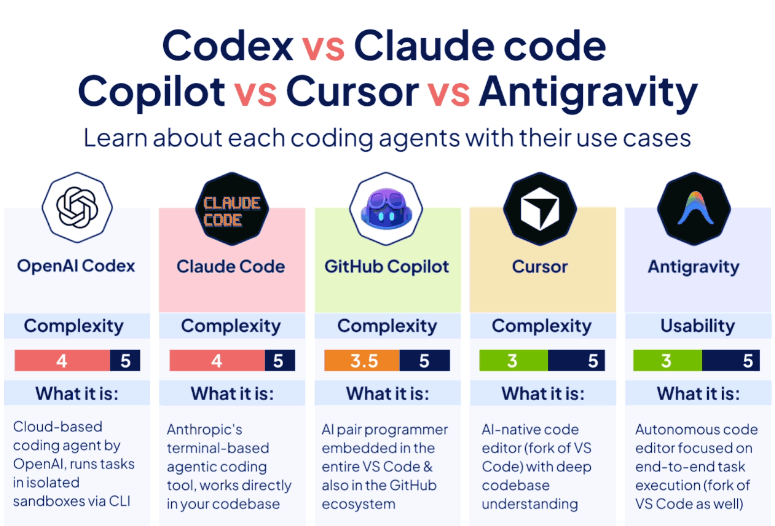
The year 2026 marks a pivotal moment in software development, where AI is no longer just a helpful assistant but an indispensable engineering partner offering autonomy and complex problem-solving capabilities. The rise of AI coding agents has transformed the developer landscape, shifting from simple autocompletion to managing entire repositories, refactoring architectures, and building production-ready features from natural language prompts. This comprehensive guide delves into the top five AI coding agents dominating the market: OpenAI Codex, Claude Code, GitHub Copilot, Cursor, and Google Antigravity. We’ll explore their unique strengths, ideal use cases, and how they are shaping the future of software development for AI-native companies.
The Evolution of AI in Coding: From Assistants to Agents
The transformation of AI in coding has been rapid and profound. In 2023, AI coding tools offered basic line suggestions. By 2024, they were completing entire functions. Today, in 2026, the forefront of AI innovation in development environments is defined by the “Agentic IDE” – platforms where AI takes on an autonomous partnership role. This shift empowers developers to delegate complex tasks, focusing on higher-level architectural design and review rather than tedious coding. The market has seen a surge in “AI agents,” but it’s crucial to distinguish genuine autonomous agents from mere chatbot wrappers. A true AI coding agent can autonomously read, write, and execute code, plan multi-step tasks, navigate codebases, run terminal commands, execute tests, and iterate on failures without constant human intervention.
These advanced capabilities are driving a “parallel agents arms race,” with major players continually refining their offerings to provide more sophisticated and integrated solutions. The distinction between terminal-native agents (like Claude Code and OpenAI Codex CLI) and IDE-integrated agents (such as Cursor, Windsurf, and Antigravity) is becoming clearer, each catering to different developer workflows and preferences.
Decoding the Top 5 AI Coding Agents of 2026
Choosing the right AI coding agent depends heavily on your workflow, project complexity, and integration preferences. Here, we break down the five leading agents, highlighting their core functionalities, ideal applications, and key advantages and disadvantages.
OpenAI Codex: The Cloud-Based Task Orchestrator
OpenAI Codex is a cloud-based coding agent designed to run tasks in isolated sandboxes via a Command Line Interface (CLI). It excels in scenarios requiring background processing, parallel execution, and integration into CI/CD pipelines.
What is OpenAI Codex?
Codex operates as a powerful backend engine, capable of handling large-scale coding tasks without direct interaction within your Integrated Development Environment (IDE). Its cloud-based nature allows for robust resource allocation and scalability, making it suitable for demanding computational tasks. The key differentiator for Codex is its ability to create and manage sandboxed environments, ensuring that tasks are executed in isolation, which enhances security and prevents conflicts.
When to Use OpenAI Codex
Codex shines when you need to automate significant portions of your development workflow that don’t require an active IDE session. Its strength lies in:
- Background/Async Tasks: For operations that can run independently, such as nightly builds, dependency updates, or code analysis.
- Parallel Agents: Orchestrating multiple AI agents to work concurrently on different aspects of a larger project, speeding up development cycles.
- CI/CD Pipelines: Integrating directly into your Continuous Integration/Continuous Deployment workflows to automate testing, deployment, and code generation stages.
It is the ideal choice when your goal is to automate large-scale coding tasks without direct human intervention in the IDE.
Pros of OpenAI Codex
- Parallel Task Execution: Efficiently handles multiple coding tasks simultaneously, significantly accelerating development timelines.
- Secure Sandboxed Environments: Provides isolated execution environments, reducing security risks and ensuring consistency across different tasks.
Cons of OpenAI Codex
- Limited Multi-step Prompting: May struggle with complex, multi-step prompts that require dynamic decision-making and iterative refinement.
- Privacy Concerns with Cloud Data: Sending proprietary code to the cloud for processing can raise privacy and data security concerns for some organizations.
Claude Code: The Terminal-First Refactor Architect
Authored by Anthropic, Claude Code offers a terminal-based agentic coding experience, working directly within your codebase. It is celebrated for its deep repo-level reasoning and nuanced understanding of complex code structures, making it a favorite for extensive refactoring and debugging.
What is Claude Code?
Claude Code is specifically designed for developers who “live in the terminal” and require an AI assistant with a profound contextual understanding of their entire codebase. Unlike IDE-centric tools, Claude Code integrates seamlessly into command-line workflows, allowing for powerful, text-based interactions that yield significant changes across multiple files or even entire architectures. Its underlying models, such as Sonnet or Opus, are recognized for their exceptional coding capabilities.
When to Use Claude Code
For developers tackling substantial code transformations, Claude Code is an invaluable asset:
- Large Refactors: Executing architectural overhauls or significant code reorganizations that impact numerous files and modules.
- Multi-file Edits: Coordinating changes across a wide array of files, ensuring consistency and correctness across the project.
- Complex Debugging: Assisting in diagnosing and resolving intricate bugs by analyzing large code segments and suggesting comprehensive solutions.
It’s the go-to tool when you need deep, repo-level reasoning for complex code manipulations.
Pros of Claude Code
- Exceptional for Large Codebases: Its ability to maintain context and apply logical reasoning across vast amounts of code is unparalleled.
- Strongest Coding Models: Leverages advanced models like Sonnet or Opus, providing highly intelligent and accurate code suggestions and solutions.
Cons of Claude Code
- Terminal-Only Interface: Developers preferring a graphical user interface or visual feedback might find its terminal-centric nature less intuitive.
- Cost for Solo Developers: At approximately 17−20 per month, it can be a relatively expensive option for individual developers or small teams.
GitHub Copilot: The Ubiquitous Pair Programmer
GitHub Copilot has become the quintessential AI pair programmer, seamlessly embedded across Visual Studio Code and the broader GitHub ecosystem. It focuses on providing frictionless, inline suggestions that augment a developer’s existing workflow without demanding a significant change in habits.
What is GitHub Copilot?
Copilot integrates directly into your coding environment, offering real-time code suggestions, autocompletions, and snippets as you type. It acts as an intelligent companion, learning from the context of your project and universally available code to predict your next move. Its widespread adoption is largely due to its unobtrusive nature and the immediate productivity gains it offers to developers across various languages and frameworks.
When to Use GitHub Copilot
Copilot is optimally used for enhancing day-to-day coding activities:
- Inline Autocomplete: Accelerating coding by suggesting relevant lines or blocks of code as you write.
- Quick Snippets: Generating small, reusable code segments or function definitions on demand.
- PR Reviews: Assisting in identifying potential issues or suggesting improvements during the pull request review process.
It is perfect for those who want an AI boost within their familiar workflow without significant adjustments.
Pros of GitHub Copilot
- Excellent Autocompletion: Provides highly accurate and contextually relevant code suggestions, speeding up development.
- Seamless IDE Integration: Its deep embedding within VS Code and GitHub makes it incredibly easy to use and adopt.
Cons of GitHub Copilot
- Potential Over-reliance: Junior developers might develop an over-reliance on its suggestions, potentially hindering their own problem-solving skills.
- Weak Multi-file Task Handling: Struggles with coordinating complex changes across multiple files, making it less suitable for large-scale refactors compared to other agents.
Cursor: The AI-Native Code Editor
Cursor distinguishes itself as an AI-native code editor, built as a fork of VS Code, offering a deeply integrated AI experience with a profound understanding of your codebase. It aims to provide an “AI-first editor that understands your full project context,” bridging the gap between traditional IDEs and autonomous AI agents.
What is Cursor?
Cursor extends the familiar VS Code environment with advanced AI capabilities, making the AI an integral part of the editing experience. Its design principle revolves around enabling the AI to not just suggest code but to understand the architectural nuances, perform multi-file edits, and even orchestrate complex testing scenarios. Composer mode is a headline feature that generates, modifies, and coordinates changes across an entire project based on natural language descriptions, maintaining contextual consistency across the codebase.
When to Use Cursor
Cursor is best suited for developers seeking an editor where AI is a core feature, rather than an add-on:
- Complex Cross-Platform Testing: Automating and orchestrating tests across different environments and platforms with AI assistance.
- Faster Multi-file Edits: Efficiently making interconnected changes across numerous files, leveraging the AI’s deep project understanding to maintain coherence.
- Agent Mode Functionality: Its agent can autonomously run terminal commands, read error outputs, and iterate on fixes until a task is complete, handling full development cycles for routine tasks like setting up new endpoints or fixing bugs.
It’s the power user’s choice for maximum AI capability on complex projects, especially those wanting an AI-first editor with comprehensive project understanding.
Pros of Cursor
- Composer for Multi-file Edits: Its Composer mode effectively manages and coordinates changes across multiple files based on high-level instructions.
- Cloud Computing Integration: Each agent within Cursor can leverage cloud computing resources, offering scalability and powerful processing capabilities.
- Supermaven-powered autocomplete: After acquiring Supermaven, Cursor boasts some of the fastest and most accurate autocompletion on the market.
Cons of Cursor
- Performance Issues: Can be noticeably slow and laggy, particularly with large codebases, impacting developer productivity.
- API Hallucinations: Known to frequently “hallucinate” APIs that do not exist, requiring developers to verify its suggestions.
- Resource Hungry: Large projects can lead to significant RAM and CPU consumption.
- Learning Curve: Mastering Cursor’s prompt patterns and understanding when to utilize its different modes (Composer vs. inline vs. agent) requires a learning investment.
Antigravity: The Agent-First IDE from Google
Google’s Antigravity positions itself as an autonomous code editor and an agent-first IDE, also building on a fork of VS Code. Powered by Gemini models, particularly Gemini 3, it emphasizes end-to-end task execution and offers deep integration with Google’s ecosystem.
What is Antigravity?
Antigravity aims to transform the developer into an architect, delegating full-stack tasks to autonomous agents. It’s designed for a workflow where AI agents plan and execute tasks with high autonomy, having access to the editor, terminal, and browser. This focus on delegation and orchestration allows developers to operate at a higher level of abstraction, managing outcomes rather than individual code lines.
When to Use Antigravity
Antigravity is the tool of choice for a highly autonomous, agent-centric workflow:
- End-to-End Task Execution: Delegating entire features or bug fixes to AI agents, which handle planning, coding, testing, and deployment.
- Native Google Model APIs: Leveraging the power and sophistication of Google’s advanced Gemini models for superior performance and nuanced understanding.
- Browser-Based Testing: Utilizing its capabilities for comprehensive testing directly within browser environments, especially for web applications.
It’s ideal for those who prefer to act as an architect, orchestrating multiple agents to complete entire projects with minimal hands-on coding.
Pros of Antigravity
- Generous Free Tier Quota: Offers a significant free tier, making it accessible for individual developers or small projects to explore its capabilities.
- Native Google Model APIs: Direct access to powerful Google models, ensuring cutting-edge AI performance.
- Browser for Testing: Provides built-in capabilities for browser-based testing, streamlining the web development workflow.
- Agent-first workflow: Higher autonomy with multiple agents planning and executing tasks across editor, terminal, and browser environments.
Cons of Antigravity
- Limited Community Support: Being a newer entrant, it currently has less community support and resources compared to more established tools.
- Heavy Reliance on Google’s Ecosystem: For users outside the Google ecosystem, integration might be less straightforward or preferred.
- Can be resource intensive: Depending on the complexity of the tasks and the number of agents orchestrated, resource consumption can be a factor.
Quick Decision Guide: Which Agent For Which Task?
To simplify your choice among these powerful AI coding agents, consider this quick decision guide:
- Need async, sandboxed task automation? → OpenAI Codex
- Terminal-first, large codebase refactoring? → Claude Code
- Daily autocomplete within VS Code/GitHub? → GitHub Copilot
- AI-native editor with deep project context? → Cursor
- Orchestrating multiple agents end-to-end? → Antigravity
This guide provides a starting point, but the optimal choice often involves evaluating each tool against a specific project or workflow.
The Future is Agentic: Implications for Developers and Companies
The rise of AI coding agents signifies a profound shift in the software development paradigm. As AI continues to achieve functional parity or superiority in coding tasks, the roles of developers are evolving. The accompanying text with the “Timeline to Technical Capability” table starkly illustrates this, predicting that “Coders” will see AI writing, testing, deploying, and maintaining systems by 2028. This doesn’t necessarily mean the “demise” of developers but rather a transformation of their responsibilities.
The Developer as Architect and Orchestrator
In this agentic future, developers will increasingly transition from hands-on coding to roles as architects, strategists, and orchestrators of AI agents. Their expertise will be in defining complex problems, designing high-level solutions, and reviewing the output of AI agents. The demand for meticulous prompt engineering, understanding AI capabilities and limitations, and critical evaluation of AI-generated code will become paramount. This shift requires a new skill set focused on managing AI workflows, debugging AI inaccuracies, and ensuring the ethical and performant deployment of AI-driven systems.
Productivity Gains and the Winner-Take-All Economy
The promise of AI coding agents is immense productivity gains—10x, 50x, or even 100x efficiency for augmented professionals. However, as the provided text suggests, this could lead to a “winner-take-all economy.” Highly skilled developers who master these new tools will amplify their output and value, potentially commanding significantly higher compensation. Conversely, “average-performing professionals” in coding, much like in other fields such as radiology and law, may find their roles at risk of redundancy. “AI-augmented excellence costs less” than “mediocrity” when AI can perform foundational tasks with greater speed and accuracy.
This scenario raises important questions about skill evolution and continuous learning. Developers who embrace and adapt to these agentic tools will thrive, while those who resist or fail to upskill may face challenges. The onus is on both individuals and organizations to invest in training and re-skilling programs to navigate this transformative era.
Ethical Considerations and Data Privacy
With AI agents handling increasingly sensitive tasks and accessing vast amounts of proprietary code, ethical considerations and data privacy become critical. The warning from OpenAI Codex regarding “sending code to the cloud raises privacy concerns” underscores this point. Companies must carefully evaluate the security protocols and data handling policies of their chosen AI agents, especially with cloud-based solutions. Ensuring compliance with data protection regulations and mitigating risks of intellectual property leakage will be non-negotiable. The development of robust, local AI agents or highly secure hybrid models might offer solutions to these concerns, allowing organizations greater control over their sensitive information.
Best Practices for Integrating AI Coding Agents
To maximize the benefits of AI coding agents while mitigating potential drawbacks, consider these best practices:
Start Small and Iterate
Begin by integrating AI agents into less critical tasks or smaller projects. This allows your team to familiarize themselves with the tool, understand its quirks, and develop effective prompt engineering strategies without high-stakes pressure. Gradually scale up their usage as confidence and proficiency grow.
Develop Strong Prompt Engineering Skills
The effectiveness of AI agents heavily relies on the quality of prompts they receive. Invest time in training your team on how to craft clear, concise, and comprehensive prompts that guide the AI towards the desired outcome. Understanding the AI’s limitations and how to refine prompts through iterative feedback is key to unlocking its full potential.
Emphasize Human Oversight and Review
While AI agents offer autonomy, human oversight remains crucial. All AI-generated code should be thoroughly reviewed, tested, and validated by human developers. This ensures code quality, prevents the introduction of subtle bugs, and maintains adherence to project standards and ethical guidelines. Developers should act as critical reviewers and editors, not just consumers, of AI output.
Understand Model Limitations and Biases
Like any technology, AI models have limitations and can inherit biases from their training data. Be aware of the potential for “hallucinations” or suboptimal solutions. Encourage a culture of skepticism and critical thinking when evaluating AI-generated content. Regularly update your understanding of the models your agents use and their known characteristics.
Prioritize Security and Privacy
Before adopting any AI coding agent, conduct a thorough assessment of its security features, data handling policies, and compliance with relevant regulations. For cloud-based solutions, understand where your data is stored, how it is encrypted, and who has access to it. For highly sensitive projects, consider agents that offer on-premise deployment or robust local processing capabilities.
Continuous Learning and Adaptation
The AI landscape is evolving rapidly. Stay informed about new tools, updates to existing agents, and emerging best practices. Encourage continuous learning within your team to adapt to new functionalities and maintain a competitive edge. This includes participating in community forums, attending webinars, and experimenting with new capabilities as they arise.
Conclusion: Embracing the Agentic Future of Coding
The year 2026 presents a thrilling yet challenging time for the software development industry. AI coding agents like OpenAI Codex, Claude Code, GitHub Copilot, Cursor, and Antigravity are not just tools; they are foundational components of AI-native companies, promising unparalleled productivity and innovation. Each agent offers a distinct approach, catering to different workflows—from cloud-based task automation to terminal-first refactoring, from inline suggestions to AI-native IDE experiences, and from orchestrating multiple agents to end-to-end task execution.
The future of coding is undeniably agentic, demanding a new breed of developers who are adept at architectural design, AI orchestration, and critical evaluation. As these technologies mature, they will reshape job roles, elevate the value of highly skilled professionals, and underscore the importance of continuous learning and adaptation. By understanding the strengths and weaknesses of each leading AI coding agent and adopting best practices for their integration, organizations and individual developers can intelligently navigate this transformative era, harnessing the power of AI to build the next generation of software.
Is your organization ready to fully leverage the power of AI coding agents?
At IoT Worlds, we specialize in guiding businesses through the complexities of AI integration and digital transformation. Whether you’re looking to optimize your development workflows, implement state-of-the-art AI solutions, or simply understand how these technologies can drive your business forward, our expert consultants are here to help.
Don’t get left behind in the agentic revolution. Embrace the future with confidence.
Contact us today for a personalized consultation:
Email: info@iotworlds.com
