

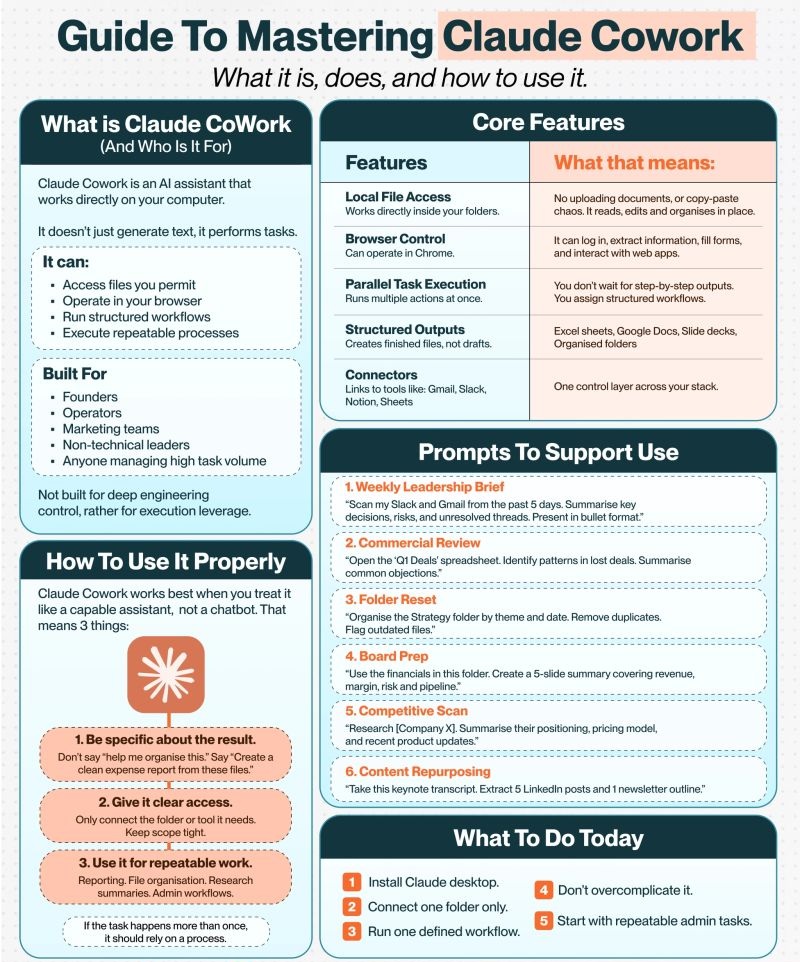
In the fast-paced world of startups, every minute counts. Founders are constantly juggling a myriad of responsibilities, from strategic planning to day-to-day operations. The promise of artificial intelligence (AI) to alleviate this burden is enticing, yet many struggle to harness its full potential. While the term “AI” often conjures images of chatbots providing quick answers, a new paradigm is emerging: AI as an active, integrated team member. This guide dives deep into Claude Cowork, an AI assistant designed not just to generate text, but to perform tasks directly on your computer, revolutionizing how founders, operators, marketing teams, non-technical leaders, and anyone managing high-task volumes can reclaim significant portions of their week.
Unlike conventional AI tools that demand constant human supervision and repetitive copy-pasting, Claude Cowork is built for structure and repeatable processes. It transforms AI from a reactive conversation partner into a proactive digital collaborator that works efficiently in the background, executing workflows and delivering polished, ready-to-use outputs. This shift from an AI you chat with to an AI that works for you is where the true power lies, enabling you to automate admin tasks, streamline operations, and focus on what truly drives your business forward.
This comprehensive guide will explore the core features of Claude Cowork, detail six powerful ways it saves founders 12+ hours a week, offer insights on how to use it properly, and provide a clear roadmap for getting started.
What is Claude Cowork (And Who Is It For)?
Claude Cowork represents a significant leap from traditional AI chatbots. It’s an intelligent assistant that operates directly on your computer, interacting with your files and applications to perform defined tasks. It doesn’t just assist with generating ideas or writing snippets; it executes. This distinction is crucial for understanding its transformative potential.
Beyond the Chatbot: An AI That Performs Tasks
Most users interact with AI solely through a chat interface, asking questions and receiving text-based responses. While useful for quick queries, this approach often leaves the “doing” to the human. Claude Cowork, however, is engineered to bridge this gap. It’s an environment where Claude can execute with operational depth. Instead of merely providing answers, it directly manipulates files, interacts with web applications, and runs multi-step workflows.
Imagine an AI that can:
- Access files you permit: Working directly within your specified folders, reading, editing, and organizing documents in place, eliminating the need for constant uploads and downloads.
- Operate in your browser: It can log in to web applications, extract information from websites, fill forms, and interact with various online tools, making it invaluable for research and web-based tasks.
- Run structured workflows: Instead of single-prompt interactions, Claude Cowork executes complex, multi-step processes you define.
- Execute repeatable processes: This is where its efficiency truly shines, turning one-off instructions into consistent, auditable work.
This functionality makes Claude Cowork less of a conversational helper and more like a programmable, refineable employee.
Who Benefits Most from Claude Cowork?
Claude Cowork is designed for individuals and teams who need more than just conversational AI. Its capabilities are particularly impactful for:
- Founders: Automating administrative tasks, market research, and content generation frees up invaluable time for strategic decision-making and business growth.
- Operators: Streamlining operational processes, file organization, and reporting can drastically improve efficiency and reduce manual errors.
- Marketing Teams: From content repurposing to competitive analysis and social media scheduling, Cowork can elevate marketing efforts without increasing headcount.
- Non-technical Leaders: The platform is accessible and requires no coding, enabling leaders to automate complex workflows without needing technical expertise.
- Anyone Managing High Task Volume: If your daily routine is clogged with repetitive tasks, Claude Cowork can absorb this workload, allowing you to focus on higher-value activities.
It’s important to note what Claude Cowork is not primarily built for: deep engineering control. Instead, its strength lies in providing execution leverage, making complex tasks actionable for a broader audience.
Six Ways Claude Cowork Saves Founders 12+ Hours a Week
The promise of reclaiming substantial time is not an exaggeration with Claude Cowork. By intelligently automating recurring tasks and streamlining workflows, founders can significantly reduce their weekly operational burden. Here are six key areas where Claude Cowork delivers remarkable time savings.
1. Local File Access: Connect a Folder and Work Directly Inside It
One of the most immediate and impactful benefits of Claude Cowork is its ability to access and manipulate files directly within your local folders. This eliminates the cumbersome process of uploading documents to cloud-based AI tools, waiting for processing, and then manually downloading and organizing the outputs.
- What it means: No uploading documents, no copy-paste chaos. Claude Cowork reads, edits, and organizes your files in place. This level of direct interaction with your file system reduces friction and potential errors associated with moving data between platforms.
- Time saved: Hours previously spent on file management, ensuring correct versions, and consolidating information. For instance, generating reports from various documents stored on your drive becomes an automated process rather than a manual collation effort. It streamlines tasks like creating expense reports or organizing project files.
By granting Claude Cowork permission to access specific folders, you empower it to perform tasks like:
- Consolidating data from multiple spreadsheets.
- Extracting key information from a series of PDFs.
- Organizing project files by theme and date, removing duplicates, and flagging outdated documents.
- Creating new documents based on existing templates and data.
This ability makes Claude Cowork feel like a true co-worker, working within your existing digital environment rather than an isolated external tool.
2. Browser Control: Operate Inside Your Browser (The Biggest Time-Saver)
This capability is arguably the most significant time-saver for founders. Claude Cowork’s ability to operate directly within your web browser transforms how you interact with online applications and information, pulling it directly into your workflow without manual intervention.
- What it means: Claude Cowork can log in to web applications, extract specific information from websites, fill out online forms, and interact with various web-based tools. It turns your browser into an extension of its operational environment.
- Time saved: This feature can save founders countless hours on research, data entry, and repetitive web-based tasks. Imagine automating competitive intelligence, gathering market data, or even streamlining customer support inquiries that involve navigating several web pages. Tasks that once required human clicks, scrolls, and copy-pasting across dozens of tabs can now be executed autonomously.
Examples of high-impact use cases include:
- Competitive Intelligence: Researching competitors, summarizing their positioning, pricing models, and recent product updates across various websites.
- Market Research: Extracting data from industry reports, news articles, and social media for market analysis.
- Lead Generation: Populating CRM fields with data gathered from LinkedIn profiles or company websites.
- Content Curation: Gathering articles, videos, or news items related to specific topics for content pipelines.
This level of browser control transcends simple web scraping; it’s about enabling Claude Cowork to intelligently interact with the internet as a human would, allowing it to perform complex, multi-step online operations with precision and speed.
3. Parallel Task Execution: Run Multiple Tasks at the Same Time
Efficiency often hinges on the ability to multitask effectively. Claude Cowork’s parallel task execution feature allows it to perform multiple actions simultaneously, dramatically accelerating the completion of complex projects.
- What it means: Instead of waiting for one output before initiating the next step, you assign structured workflows, and Claude Cowork runs multiple actions at once. This means you don’t wait for step-by-step outputs; the system is designed to handle concurrent processing.
- Time saved: This feature is invaluable for complex projects that typically involve sequential tasks. For example, if you need to analyze sales data, draft a marketing report, and update your CRM, Claude Cowork can initiate all these processes simultaneously. This parallelism eliminates bottlenecks and idle time, compressing work that might take hours or days into a fraction of the time.
Consider these scenarios:
- Campaign Launch: Simultaneously generating social media posts, drafting email sequences, and scheduling content based on a single brief.
- Financial Reporting: Extracting data from multiple ledgers, generating summary reports, and preparing a presentation deck for stakeholders, all concurrently.
- Onboarding Processes: Creating user accounts, drafting welcome emails, and setting up initial data entries in multiple systems at the same time.
By assigning a structured workflow, founders can delegate entire projects to Claude Cowork, confident that the various components will be processed efficiently and in parallel, leading to faster completion times and significantly less manual oversight.
4. Structured Outputs: Create Finished Files in the Right Format
A common frustration with AI tools is receiving raw, unformatted text that still requires significant human intervention to become usable. Claude Cowork addresses this by delivering structured, finished outputs.
- What it means: Claude Cowork doesn’t just generate text; it creates finished files in specific formats, eliminating the need for manual reformatting or conversion. This includes Excel sheets, Google Docs, Slide decks, and organized folders. This is not about drafts; it’s about final deliverables.
- Time saved: Founders save immense time by receiving ready-to-use documents. Instead of copying and pasting AI-generated content into a spreadsheet or presentation, then meticulously formatting it, Claude Cowork delivers the final product. This is particularly beneficial for routine reports, presentations, and organizational tasks.
Practical applications include:
- Board Prep: Generating a 5-slide summary covering revenue, margin, risk, and pipeline directly into a presentation format.
- Commercial Review: Analyzing a ‘Q1 Deals’ spreadsheet to identify patterns in lost deals and summarizing common objections directly into a report or spreadsheet.
- Content Generation: Repurposing a keynote transcript into five LinkedIn posts and a newsletter outline, delivered as polished, ready-to-publish content.
- Financial Analysis: Creating Excel sheets with working formulas based on raw financial data.
This capability ensures that the AI’s output is immediately actionable, dramatically reducing the “last mile” effort often required to integrate AI-generated content into business operations.
5. Connectors: Connect Directly to Your Existing Tools
The modern business environment relies on a diverse ecosystem of digital tools. Claude Cowork’s robust integration capabilities allow it to link directly with your existing applications, creating a unified control layer across your entire tech stack.
- What it means: Claude Cowork can connect to popular tools such as Gmail, Slack, Notion, and Google Sheets. This creates a central point of control, allowing the AI to pull information from and push outputs to the applications you already use daily.
- Time saved: This level of integration eliminates the silo effect between different tools, saving founders hours spent manually transferring data, cross-referencing information, or orchestrating tasks across disparate platforms. It enables seamless workflows, transforming a collection of individual apps into a cohesive operational unit.
Consider these powerful integrations:
- Weekly Leadership Brief: “Scan my Slack and Gmail from the past 5 days. Summarize key decisions, risks, and unresolved threads. Present in bullet format.” This task, which would typically involve hours of sifting through communications, is automated.
- Customer Support: Integrating with a CRM and communication tools to summarize customer inquiries, identify common issues, and even draft responses based on past interactions.
- Project Management: Updating Notion boards with task statuses derived from team communications in Slack or email.
- Data Synchronization: Pulling data from Google Sheets for analysis and then pushing the summarized insights back to a presentation in Google Slides.
By acting as a central orchestrator, Claude Cowork enables a “digital operator” functionality, where it understands and interacts with your workflow across different applications, ensuring data consistency and workflow continuity.
6. Repurpose Existing Content into New Formats
Content creation is a cornerstone for many businesses, but the process of adapting existing assets for new platforms can be time-consuming. Claude Cowork excels at repurposing content, maximizing the value of your existing materials.
- What it means: You can feed Claude Cowork existing documents, transcripts, or long-form content, and it will transform them into various new formats suitable for different channels. This is about leveraging your intellectual property efficiently.
- Time saved: This feature liberates founders and marketing teams from the repetitive grind of manual content adaptation. Instead of spending hours or even days creating new versions of content, Cowork can generate multiple outputs from a single source in minutes. This dramatically increases content velocity and reach without additional effort.
Examples of content repurposing include:
- Keynote to Social Media: Taking a keynote transcript and extracting five LinkedIn posts along with a newsletter outline, tailored for each platform’s best practices.
- Webinar to Blog Posts: Converting a webinar transcript into a series of SEO-optimized blog posts.
- Podcast to Short Videos: Summarizing key segments of a podcast and generating scripts for short video clips.
- Report to Infographic Text: Distilling complex data reports into concise, engaging text suitable for infographic creation.
By efficiently transforming your content, Claude Cowork ensures that your message reaches a broader audience through diverse channels, all while saving significant creative and administrative time. It allows for a human touch to be added after generation, ensuring authenticity and alignment with your brand voice.
How to Use Claude Cowork Properly: Treating it as a Capable Assistant
The true power of Claude Cowork is unlocked when it’s treated not as a simple chatbot, but as a capable, intelligent assistant. This requires a shift in mindset and a structured approach to how you interact with it. Most people stop at the basic “chatbot” level, missing out on the genuine operational multiplier Claude Cowork can be.
1. Be Specific About the Result
Vague instructions lead to vague outputs. To get the most precise and useful results from Claude Cowork, your brief must be crystal clear and outcome-oriented.
- Avoid: Saying “Help me organize this” or “Make this better.” These instructions are open to broad interpretation and often result in generic outputs that still require significant human revision.
- Instead, be explicit: “Create a clean expense report from these files, categorized by date and vendor, and export it as an Excel spreadsheet.” Or, “Summarize the key takeaways from the last five team meetings, highlighting action items and presenting them in a bulleted list in a Google Doc.”
- Focus on the desired end product: Define the exact format, content requirements, and purpose of the output. The more specific you are about the result you want, the less ambiguous the task becomes for the AI. This detailed input is the scaffolding that allows the system to act reliably.
2. Give It Clear Access
Security and control are paramount when an AI has direct access to your computer and applications. Granting Claude Cowork clear, scoped access is critical for both effective operation and maintaining data integrity.
- Only connect the folder or tool it needs: Do not give it blanket access to your entire system. If a task requires accessing a specific project folder, grant permission only to that folder. If it needs to interact with Gmail, connect only your Gmail account.
- Keep scope tight: This principle not only enhances security but also helps Claude Cowork focus its efforts. With a well-defined operational scope, the AI can execute tasks more precisely without getting sidetracked or attempting actions outside its intended purpose.
- Understand the “why”: Claude Cowork works by being given context it can act on reliably. Clear access parameters are part of that context, defining the boundaries within which it can operate.
3. Use It for Repeatable Work
Claude Cowork’s architecture is built for continuous work and repeatable processes, not one-off interactions. This is where its automation potential truly shines.
- Identify recurring tasks: Reporting, file organization, research summaries, and administrative workflows are prime candidates for automation. If a task happens more than once a week or month, it should be codified into a process.
- Build a process: Instead of performing a task manually each time, document the steps, define the inputs, and specify the desired outputs. This becomes the “recipe” that Claude Cowork can follow consistently. The difference between using AI well and using it casually is structure, and Cowork is built for structure.
- The compounding effect: Once you teach Cowork how you work, it can repeat those workflows with surprising consistency. This leads to a compounding effect of time savings, as the initial effort of setting up a workflow pays dividends with every automated execution.
By adhering to these three principles – specificity, clear access, and a focus on repeatable work – you transform Claude Cowork from a novelty into an indispensable team member that consistently delivers value and frees up your valuable time.
Core Features: The Underlying Architecture of Productivity
To truly master Claude Cowork, it’s essential to understand its foundational features. These capabilities form the scaffolding upon which its powerful automation and task execution are built.
Local File Access
Claude Cowork’s ability to directly interact with files stored on your local computer is a game-changer. It’s not just about reading; it’s about active manipulation.
- Works directly inside your folders: This means Claude Cowork doesn’t require you to upload documents to external servers for processing. It operates within the confines of your permitted local directories.
- Implication: This significantly simplifies workflows by eliminating the “copy-paste chaos” often associated with AI tools. It reads, edits, and organizes files in place, maintaining data locality and reducing the overhead of data transfer and management. For instance, you can point it to a folder of meeting notes and have it summarize them, creating a new document directly within that folder.
Browser Control
The internet is a vast repository of information and a common platform for business operations. Claude Cowork’s browser control feature extends its reach into this dynamic environment.
- Can operate in Chrome: This capability allows Claude Cowork to navigate websites, interact with web-based applications, extract specific information from web pages, and even fill out forms.
- Implication: This opens up a world of automation for tasks that rely on web interaction. From competitive research to lead generation and real-time data pulling from online dashboards, Claude Cowork can act as your digital web agent, performing repetitive online actions with precision. It turns browser navigation into one of its most underrated superpowers.
Parallel Task Execution
Efficiency is often measured by concurrency. Claude Cowork’s design allows it to handle multiple processes simultaneously, maximizing throughput and minimizing waiting times.
- Runs multiple actions at once: Unlike traditional, sequential processing, Claude Cowork can execute various components of a comprehensive task in parallel.
- Implication: You don’t have to wait for step-by-step outputs; instead, you assign a structured workflow, and the AI manages the concurrent execution. This is critical for accelerating complex projects that involve several interdependent or independent sub-tasks, making it a powerful tool for project management and multifaceted operations.
Structured Outputs
The value of an AI’s output is not just in its content, but also in its usability. Claude Cowork focuses on delivering outputs that are immediately actionable.
- Creates finished files, not drafts: This means you receive polished documents ready for use. These can include Excel sheets, Google Docs, Slide decks, and intelligently organized folders.
- Implication: This feature removes the burdensome post-processing work that often accompanies AI-generated content. Instead of receiving raw text that needs formatting, integration, and organization, Claude Cowork delivers final deliverables, saving you significant time and effort in the final stages of a project.
Connectors
Interoperability is key in today’s interconnected digital landscape. Claude Cowork’s connector ecosystem allows it to integrate seamlessly with your essential business tools.
- Links to tools like Gmail, Slack, Notion, Sheets: These connectors enable Claude Cowork to communicate with and operate across your existing software stack.
- Implication: This establishes one control layer across your whole stack, unifying your digital workspace. The AI can pull data from a spreadsheet, summarize discussions from Slack, draft emails in Gmail, and update project statuses in Notion, all within a single, integrated workflow. This transforms a collection of disparate tools into a coordinated operational environment.
Together, these core features enable Claude Cowork to function as an autonomous, reliable teammate that significantly enhances operational efficiency and productivity.
Prompts to Support Use: Real-World Applications
Understanding the core features is one thing; leveraging them effectively requires clear, outcome-oriented prompts. Here are examples of practical prompts that demonstrate Claude Cowork’s capabilities across various business functions.
1. Weekly Leadership Brief
Prompt: “Scan my Slack and Gmail from the past 5 days. Summarize key decisions, risks, and unresolved threads. Present in bullet format.”
- Cowork’s Action: Utilizes connectors to Slack and Gmail. It processes communications, identifies critical information based on keywords and context (e.g., “decision,” “risk,” “issue,” “action item”), and synthesizes the data into a concise, bulleted summary. This could be delivered as a Google Doc or a Markdown file directly to your specified folder.
- Founder’s Benefit: Eliminates hours of manual sifting through communication channels, ensuring you’re always up-to-date on critical developments without distraction.
2. Commercial Review
Prompt: “Open the ‘Q1 Deals’ spreadsheet. Identify patterns in lost deals. Summarize common objections.”
- Cowork’s Action: Accesses the specified local Excel or Google Sheet file. It analyzes the data columns related to “deal status” and “reasons for loss,” identifies recurring themes or keywords in recorded objections, and generates a summary report highlighting common patterns and objections.
- Founder’s Benefit: Provides rapid, data-driven insights into sales challenges, enabling quicker adjustments to sales strategies or product messaging, without manual data analysis.
3. Folder Reset
Prompt: “Organize the Strategy folder by theme and date. Remove duplicates. Flag outdated files.”
- Cowork’s Action: Accesses the designated local folder. It reads file contents and metadata to identify themes, sorts files by date, detects and deletes duplicate files (after confirmation or based on pre-defined rules), and adds a “FLAG: Outdated” tag or moves files to an “Archive” subfolder for items past a certain date threshold.
- Founder’s Benefit: Maintains a clean, organized digital workspace, ensuring critical documents are easily accessible and irrelevant clutter is removed, saving time spent searching for information.
4. Board Prep
Prompt: “Use the financials in this folder. Create a 5-slide summary covering revenue, margin, risk, and pipeline. Deliver as a Google Slides presentation.”
- Cowork’s Action: Accesses financial documents (spreadsheets, PDFs) in the specified folder. Extracts key metrics for revenue, profit margin, identified risks, and pipeline status. It then structures this information into a concise, professional 5-slide Google Slides presentation, automatically choosing appropriate layouts and potentially even generating simple charts.
- Founder’s Benefit: Drastically reduces the time and effort required to prepare for critical board meetings, allowing founders to focus on strategic insights rather than presentation formatting.
5. Competitive Scan
Prompt: “Research [Company X]. Summarize their positioning, pricing model, and recent product updates. Deliver as a concise report.”
- Cowork’s Action: Utilizes its browser control feature to navigate the web, visiting Company X’s website, news sites, press releases, and possibly industry forums. It extracts information related to their brand positioning, analyzes pricing structures (if publicly available), and identifies news about recent product launches or updates. Compiles this into a structured report document.
- Founder’s Benefit: Provides rapid, on-demand market intelligence, enabling quick strategic responses and informed decision-making without extensive manual research.
6. Content Repurposing
Prompt: “Take this keynote transcript. Extract 5 LinkedIn posts and 1 newsletter outline.”
- Cowork’s Action: Processes the provided keynote transcript. It identifies key themes, quotable sections, and actionable insights. It then generates five distinct, engaging LinkedIn posts optimized for the platform’s format and a structured outline for a newsletter, including potential subject lines and content sections.
- Founder’s Benefit: Maximizes content reach and efficiency by transforming long-form content into multiple social-media-ready formats, expanding brand presence without manual content creation. This ensures a human touch can be added for final polish.
These prompts illustrate the versatility and power of Claude Cowork. By understanding how to formulate precise instructions, founders can direct the AI to perform a wide array of complex tasks, consistently delivering valuable, ready-to-use outputs.
What to Do Today: Your Quick-Start Guide
Embarking on your journey with Claude Cowork doesn’t have to be daunting. The key is to start small, understand its capabilities, and gradually expand its role in your workflow.
1. Install Claude Desktop
The first and most fundamental step is to install the Claude Desktop application. This is essential, as Claude Cowork is not a browser-based chat mode but an environment within the desktop application where Claude can operate with greater depth. The desktop application provides the necessary interface for Claude to access your local files and interact with your computer’s environment. Without it, you’re missing the operational layer that makes Cowork unique.
2. Connect One Folder Only
Resist the urge to connect all your data sources at once. A focused start is a successful start.
- Start small: Choose a single, manageable folder that contains files related to a specific, well-defined task you wish to automate. This could be a folder for weekly reports, meeting notes, or market research.
- Purpose: This approach allows you to understand how Claude Cowork interacts with your files, builds confidence in its capabilities, and helps you refine your prompting strategy. It also maintains a tight scope for security and simplifies troubleshooting if issues arise. As the saying goes, keep the scope tight.
3. Run One Defined Workflow
Once you have a connected folder, define a single, repeatable workflow to test Claude Cowork’s capabilities.
- Choose a simple, recurring task: Think of something you do frequently that is well-structured. For example, “summarize daily feedback emails in this folder into a single Google Doc,” or “organize monthly expense receipts in this folder by vendor and date.”
- Observe and learn: Pay close attention to how Claude Cowork executes the task, what outputs it produces, and any areas where clarification might be needed. This iterative process of running, reviewing, and refining is crucial for mastering the tool.
4. Don’t Overcomplicate It
The initial fascination with AI can lead to attempts at overly complex automation. For your first steps, simplicity is key.
- Focus on basic processes: Avoid trying to automate your entire business on day one. Start with tasks that have clear inputs, defined steps, and unambiguous desired outputs.
- Iterate and build: As you gain experience and confidence, you can gradually increase the complexity of your workflows, linking more tools and automating more intricate processes. The real secret is the compounding effect of these small, consistent automations.
5. Start with Repeatable Admin Tasks
Administrative tasks are often the most time-consuming and least engaging for founders. They are also excellent candidates for early automation.
- Identify low-hanging fruit: Think of tasks like file organization, routine reporting, summarizing lengthy documents, or basic data entry. These are typically well-defined and occur regularly.
- Establish processes: For any task that happens more than once, it should rely on a process. Claude Cowork is built for structure. Automating these first allows you to quickly experience the time-saving benefits and solidify your understanding of how to structure effective prompts and workflows.
By following these practical steps, you can set yourself up for success with Claude Cowork, transforming it from a powerful concept into a tangible source of efficiency and productivity for your business.
Common Pitfalls: What Most Users Get Wrong
Despite its immense potential, many users fail to harness Claude Cowork effectively. This typically stems from using it like a traditional chatbot rather than understanding its designed capabilities as an autonomous agent. Recognizing these common pitfalls can help you avoid them and unlock its true value.
Using it like a chatbot instead of an assistant
The most significant mistake users make is treating Claude Cowork as merely another conversational AI. They ask general questions and expect instant, standalone answers.
- The problem: Chatbots excel at answering questions. Claude Cowork is built to perform tasks and execute workflows, akin to an employee. A chatbot interaction is synchronous – you type, it responds, then you typically copy-paste and move on. Cowork operates asynchronously, running tasks in the background or on a schedule.
- The solution: Shift your mindset from asking questions to assigning tasks. Frame your interactions as delegating work to a capable assistant, complete with clear objectives and desired outcomes.
Asking vague questions instead of assigning specific tasks
Just as a human assistant requires clear instructions, so too does Claude Cowork. Vague prompts lead to imprecise or unhelpful outputs.
- The problem: Phrases like “help me organize this” or “make this document better” lack the necessary specificity for Cowork to leverage its operational capabilities. It doesn’t know how to organize or what aspects to improve.
- The solution: Be highly specific about the desired result. Define the format, content, and purpose. For example, instead of “summarize this,” say “summarize this 20-page market research report into a 2-page executive brief, highlighting key trends and competitor analysis, and save it as a Google Doc in the ‘Market Research’ folder.”
Treating it as a one-off tool instead as part of your process
The real power of Claude Cowork comes from its ability to automate repeatable processes, not from single, isolated interactions.
- The problem: Many see Cowork as a quick-fix tool for individual tasks, missing its core value proposition of sustained automation. They use it once, get an output, and then revert to manual methods for the next similar task.
- The solution: Integrate Claude Cowork into your recurring workflows. For any task that happens regularly (e.g., weekly reports, monthly content updates, quarterly financial summaries), design a process for Cowork to handle it. If a task happens more than once a week, it should run in a process.
Connecting everything at once instead of starting with a focused workflow
The desire to automate everything can be overwhelming and counterproductive in the initial stages.
- The problem: Attempting to connect all your folders, applications, and data sources simultaneously can create complexity, security risks, and make it difficult to troubleshoot. It leads to confusion about access permissions and expected outputs.
- The solution: Start small and focused. Connect one folder and define one workflow. Master that initial automation, then gradually expand its scope. This iterative approach ensures stability, allows for learning, and builds confidence in the system’s capabilities. Don’t overcomplicate it.
By consciously avoiding these common errors, founders and teams can accelerate their learning curve with Claude Cowork and quickly transition it from a novel AI tool to an indispensable, time-saving operational force.
Conclusion: Transform Your Business with Claude Cowork
Claude Cowork represents a pivotal shift in how we interact with artificial intelligence. It moves beyond the reactive nature of chatbots to become a proactive, task-executing assistant that operates directly within your digital environment. For founders, operators, and any professional grappling with high task volumes, this is not merely a productivity hack; it’s a fundamental change in how work gets done.
By leveraging its ability to access local files, control your browser, execute tasks in parallel, deliver structured outputs, connect to your existing tools, and repurpose content, Claude Cowork empowers you to reclaim an astonishing amount of time – potentially 12+ hours a week. Imagine the strategic thinking, market engagement, and innovation you could achieve if freed from the manual grind of administrative and repetitive operational tasks.
Mastering Claude Cowork isn’t about finding a magic prompt; it’s about understanding its architecture, treating it as a capable assistant rather than a chatbot, and embedding it into your repeatable processes. The hard work isn’t in the AI’s reasoning, but in setting up the scaffolding – providing context, access, and defining the tasks worth automating. Once this structure is in place, the compounding effect on your productivity and time savings will be significant.
Unlock the Future of IoT with IoTWorlds!
As you explore the vast potential of AI tools like Claude Cowork to streamline your operations, consider how these advancements converge with the transformative power of the Internet of Things (IoT). At IoT Worlds, we specialize in guiding businesses through the complexities of IoT implementation, helping you build intelligent, connected systems that automate processes, generate actionable data, and drive unprecedented efficiency. Our expertise spans hardware to cloud, ensuring your business is not just keeping pace with technology, but leading it.
Ready to explore how IoT can further amplify your operational efficiency and create new avenues for growth? Contact us today to discuss your unique needs and discover tailored IoT solutions that will propel your business forward.
Email us at info@iotworlds.com to schedule a consultation.
