

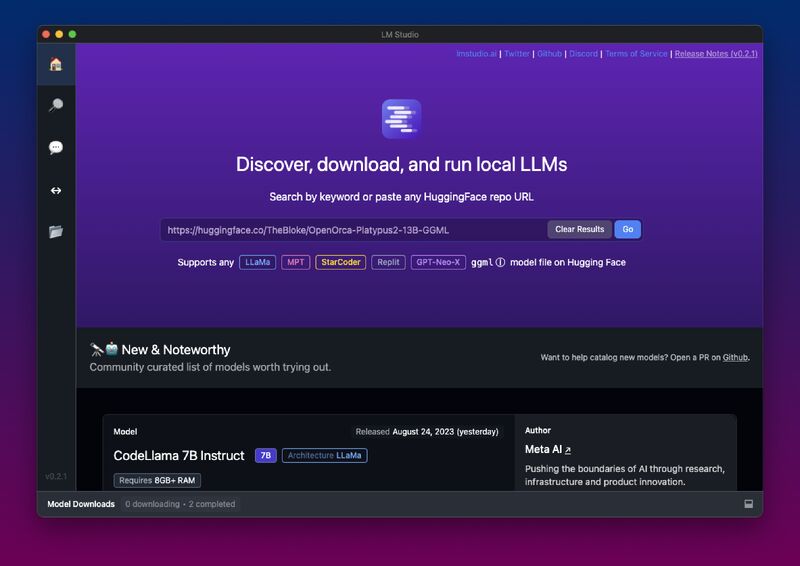
Here the easiest method for running an AI chat application on your personal computer using LM Studio.
LM Studio streamlines the model deployment process by efficiently managing multiple models and their variants (quantized variants included) tailored to each user’s system requirements. Furthermore, scraping websites to provide context to enhance understanding and response capability of models are supported as well.
What is LM Studio?
LM Studio is an easy-to-use software tool designed for running large language models on your computer. By eliminating external platforms like Hugging Face or GitHub, this user-friendly program provides users with access to an extensive library of models they can explore and download from. Plus, its intuitive user interface makes discovering models simple while offering valuable details about each model, including size and ratings information.
With LM Studio, it has never been simpler to experiment with advanced AI models and apply them to your business. The software runs on most major operating systems and its easy installation process makes it accessible even to those without technical experience. Furthermore, its website contains extensive documentation and FAQs to assist users get acquainted with LM Studio as well as help resolve any potential issues they might face while using it.
LM Studio allows users to easily create local inference servers for AI applications hosted on their own computers. Launched directly from within the interface of LM Studio and configured according to specific API requirements from your application, these local servers ensure maximum performance while eliminating costly cloud services costs.
LM Studio boasts numerous features designed to streamline and optimize the modeling process, such as its automatic prompt formatting feature that enables users to configure models with one click – this makes testing out different prompt formats in your application easy, leading to improved accuracy and speed. Furthermore, its file management system lets you view downloaded model sizes quickly before accessing their locations on your computer.
LM Studio is available free for personal use and runs on most computers; however, GPU offloading will require full GPU offloading capabilities as well as high-speed internet to load models. In addition to modeling capabilities, LM Studio also features OCR/PDF editing for document management purposes as well as OCR capabilities – making it an invaluable asset in increasing productivity and streamlining work processes.
LM Studio Compatibility
LM Studio compatibility with other software programs is an incredible advantage for users looking to create an AI chatbot but don’t want the hassle of coding or setting up a server. Users can run large language models (LLMs) directly on their local machine without an internet connection required and with greater privacy guaranteed.
LM Studio features extensive documentation, tutorials, and FAQs to assist users in getting started with its program and troubleshooting any potential issues they might experience. A dedicated support team is also available for personalized assistance; and finally there is even an app allowing accessing and managing language modeling workflow from anywhere at any time from any device – truly mobile language modeling!
LM Studio is an open-source software used for training, evaluating, and deploying language models. Compatible with multiple operating systems – macOS and Linux included – as well as CPU or GPU hardware platforms, LM Studio facilitates rapid model training. This platform is easy for even newcomers to use and provides various model architectures and hyperparameters that users can select. Furthermore, LM Studio can help users develop custom language models tailored specifically to their own requirements. Once a model is complete, it can be deployed into production as a web service or integrated into existing applications.
LM Studio Features
LM Studio’s user-friendly interface makes interacting with language models easy for its users. The search function makes it possible to search a wide selection of models and identify those compatible with your systems. Furthermore, this software also provides information on each model including size and compatibility ratings so that users can select one with optimal performance for their computers.
The software also includes tools for preprocessing text and data, including tokenization, removal of special characters and filtering out stop words. Furthermore, other functions include document conversion to PDF and OCR – making managing large datasets simpler – and it has an interactive chat interface to interact with local models and modify parameters – designed to be simple and user-friendly allowing access to advanced models without needing programming knowledge.
LM Studio stands out among other platforms by automatically downloading and running language models, eliminating the need to access them via external platforms such as Hugging Face or GitHub. Furthermore, this feature can also be used to test compatibility before deploying it into production environments – an essential feature which saves both time and resources.
Users can customize their model by adjusting its number of layers and CPU threads, enabling them to optimize hardware settings for speed and efficiency – especially important on high-performance machines with multiple GPUs. The software also enables users to train their own models allowing experimentation with various architectures and optimization algorithms.
Users can utilize the chat interface to interact with their local model and observe how changes in prompts affect responses. They can even scrape websites to provide more context to the model for more relevant responses. By integrating Anything LLM, LM Studio creates an entirely private end-to-end system for document and chat interaction without relying on third-party subscription services for access. Finally, its support team and community forums are always there to answer questions or address issues.
LM Studio Pricing
LM Studio is an innovative tool that enables users to run large language models (LLMs) locally without an internet connection, providing greater privacy and data security. In addition, the program includes features like an in-app chat UI and local server compatible with OpenAI APIs – making integration with frontends like chatbots or workflow solutions like Flowise easy and seamless.
Though LM Studio is available free for personal use, a number of paid features make LM Studio particularly advantageous to businesses. These features include customizable GUIs, local inference servers, automatic prompt formatting capabilities and automated prompt formatting for prompts – features which make LM Studio ideal for testing AI frontends and workflow solutions as well as creating language maps or dictionaries to improve model performance.
The team behind LM Studio has been hard at work improving the platform to make it more user-friendly and versatile. In their most recent update, for example, they made it simpler to search and download AI models while providing advice about whether the computer could manage them. LM Studio continues its quest to make working with AI easier and more accessible by making AI easier to work with.
As LM Studio continues its expansion in Brooklyn, New York, they’re searching for enthusiastic individuals to join their efforts. Anyone curious can discover more about their position within the industry and apply at their company website. Contact IoT Worlds team to develop your best AI IoT solution and for any support on LM Studio.

