

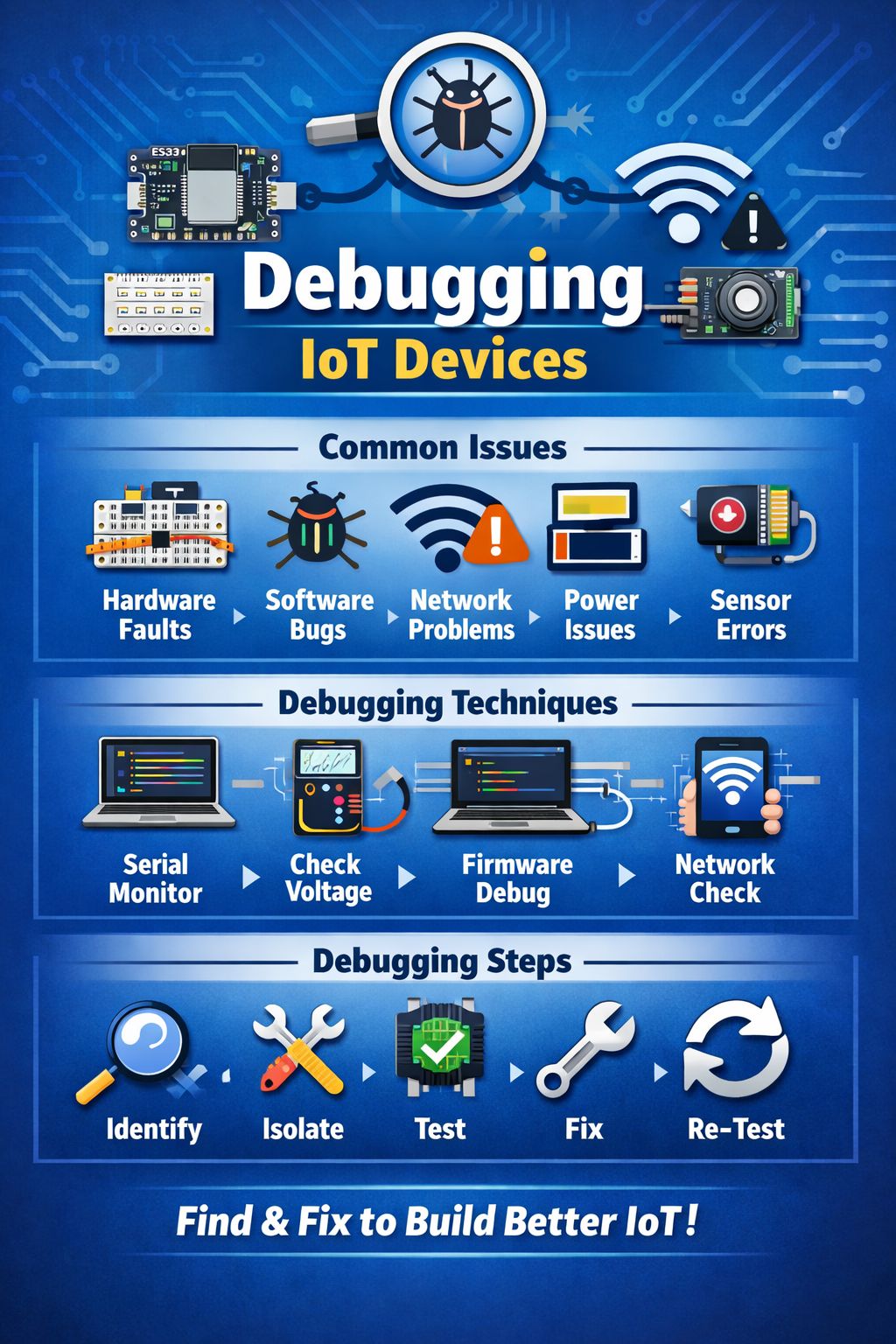
The Unseen Architecture: Why Debugging is the Backbone of IoT Success
The Internet of Things (IoT) is no longer a futuristic concept; it’s a fundamental pillar of our present and future, weaving intelligence into the fabric of our daily lives and industries. From smart homes that adjust lighting and temperature autonomously to industrial sensors optimizing manufacturing processes, IoT devices promise unprecedented levels of efficiency, convenience, and insight. However, the journey from concept to a seamlessly operating IoT ecosystem is rarely without its twists and turns. Building an IoT system is an exciting endeavor, a testament to innovation and connectivity. Yet, the true measure of an IoT engineer, developer, or enthusiast lies not just in their ability to assemble components and write code, but in their mastery of debugging – the often-underestimated art of turning errors into profound insights.
Debugging in the IoT realm is a multifaceted challenge, encompassing a spectrum of disciplines from electrical engineering to software development and network management. Unlike traditional software development where errors often manifest within a single, controlled environment, IoT debugging extends to the physical world, interacting with diverse hardware, unpredictable wireless environments, and the inherent complexities of distributed systems. This comprehensive guide aims to demystify the debugging process for IoT devices, equipping you with the knowledge, techniques, and tools to transform frustrating setbacks into valuable learning experiences that ultimately lead to more robust, reliable, and intelligent IoT solutions. We’ll delve deep into the common issues faced, explore effective debugging methodologies, introduce essential tools, and outline a streamlined debugging process that will empower you to overcome any obstacle in your IoT journey.
The Inevitable: Why Errors are a Constant in IoT
Before we embark on the specifics of debugging, it’s crucial to acknowledge an fundamental truth: errors are an integral part of the development cycle, especially in IoT. The intricate interplay of hardware, software, and network components creates numerous points of potential failure. Embracing this reality is the first step towards effective debugging. Instead of viewing errors as failures, consider them as critical feedback mechanisms, guiding you toward a deeper understanding of your system’s behavior and performance. Each bug uncovered and resolved not only improves the immediate functionality of your device but also fortifies your understanding of the underlying principles, making you a more proficient IoT architect.
This comprehensive exploration will empower you to approach debugging not as a dreaded chore, but as an essential and rewarding phase of IoT development. By transforming errors into insights, you’ll not only build stronger IoT systems but also cultivate a more resilient and problem-solving mindset crucial for navigating the ever-evolving landscape of connected technologies.
Common Obstacles: Decoding Typical IoT Device Malfunctions
The eclectic nature of IoT systems means that problems can arise from various sources within the hardware, software, networking, power management, or sensor data acquisition layers. Understanding these common malfunction categories is the first step toward effective diagnosis and resolution.
Unraveling Hardware Faults: The Tangible Troubles
Hardware is the physical foundation of any IoT device. Flaws at this level can be particularly challenging because they often present as intermittent issues or complete device failure without clear software errors.
Loose Wiring and Connections: A Silent Saboteur
One of the most frequent yet overlooked hardware issues is loose wiring or poor connections. In a world of miniature components and intricate circuit boards, a slightly dislodged wire, a poorly soldered joint, or an improperly seated connector can lead to erratic behavior, intermittent data drops, or complete system outages. Vibrations, thermal expansion and contraction, or even the simple act of manipulating the device can exacerbate these issues.
- Symptoms: Intermittent power, flickering LEDs, inconsistent sensor readings, or outright device failure.
- Initial Checks: Visually inspect all wiring harnesses, pin headers, and solder points. Gently wiggle connectors to see if the issue resolves or worsens.
Damaged Components: The Visible and Invisible
Components can be damaged during manufacturing, transport, assembly, or even during operation due to electrical surges or improper handling. This damage can range from visibly burnt-out resistors to microscopically fractured traces on a PCB.
- Symptoms: Component overheating, strange smells, smoke, complete lack of functionality for a specific module, or unexpected behavior.
- Initial Checks: Look for any physical signs of damage like scorch marks, bulging capacitors, or bent pins. Sometimes, damage is invisible to the naked eye, requiring more advanced diagnostic tools.
Manufacturing Defects: The Hidden Flaws
While less common with reputable manufacturers, manufacturing defects can creep into even the best-designed hardware. These can include anything from tiny short circuits to incorrectly populated components on a PCB.
- Symptoms: Device fails out of the box, consistent failures across a batch of devices, or strange electrical characteristics.
- Initial Checks: Often difficult to diagnose without specialized equipment. Compare the faulty board with a known good one if available.
Navigating Software Bugs: The Code-Level Conundrums
Software dictates the logic and behavior of an IoT device. Bugs in the firmware or application code are a ubiquitous challenge, requiring a systematic approach to pinpoint and rectify.
Logic Errors: The Flawed Reasoning
Logic errors occur when the code doesn’t do what it’s intended to do, even if it runs without crashing. This could be incorrect conditional statements, flawed algorithms, or an incorrect interpretation of sensor data.
- Symptoms: Incorrect output, unexpected device behavior, operations not occurring as programmed, or data being processed incorrectly.
- Initial Checks: Step-through debugging, extensive logging, and comparing actual behavior against expected behavior.
Memory Management Issues: The Digital Drain
IoT devices often operate with limited memory (RAM) and storage. Poor memory management, such as memory leaks or buffer overflows, can lead to instability, crashes, or unpredictable behavior over time.
- Symptoms: Device crashing intermittently, performance degradation over extended periods, unexpected reboots, or failure to allocate resources.
- Initial Checks: Monitor memory usage, use memory profiling tools if available, and carefully manage dynamic memory allocation.
Race Conditions and Concurrency Issues: The Timing Traps
In multi-threaded or event-driven IoT applications, race conditions can occur when multiple operations try to access or modify shared resources simultaneously, leading to unpredictable outcomes.
- Symptoms: Intermittent and hard-to-reproduce bugs, corrupted data, or system freezes under specific load conditions.
- Initial Checks: Use mutexes, semaphores, or other synchronization primitives. Thoroughly test under various concurrency scenarios.
Incorrect Interrupt Handling: The Interrupting Problem
Many IoT devices rely on interrupts to respond to events from sensors or peripherals efficiently. Incorrect interrupt service routines (ISRs) or improper handling of data within ISRs can lead to data loss or system instability.
- Symptoms: Missed events, corrupted data buffers, or erratic system behavior after an external event.
- Initial Checks: Ensure ISRs are short and efficient, and that shared data is protected.
Conquering Network Problems: The Connectivity Complications
IoT devices live and breathe on networks. Issues with connectivity, data transmission, or network configuration can effectively render a device useless, regardless of its hardware or software integrity.
Wi-Fi Disconnects and Instability: The Wireless Wobbles
Wireless connectivity, particularly Wi-Fi, is prone to interference, signal degradation, and range limitations. Frequent disconnections or an inability to connect reliably can be a major headache.
- Symptoms: Device going offline frequently, slow data transmission, or complete failure to connect to the network.
- Initial Checks: Check signal strength, ensure correct Wi-Fi credentials, verify router settings, and look for interference sources.
IP Address Conflicts and DNS Issues: The Address Anarchy
In larger networks, an IP address conflict can arise if two devices are assigned the same IP address. DNS issues can prevent devices from resolving hostnames to IP addresses, hindering communication with cloud services.
- Symptoms: Device unable to communicate with other devices on the network, inconsistent connectivity, or inability to reach internet services.
- Initial Checks: Check DHCP server logs, verify device IP address and DNS settings, and ping known services.
Latency and Packet Loss: The Slow-Motion Syndrome
High latency (delay in data transmission) and packet loss (data packets not reaching their destination) can severely impact the performance of real-time IoT applications and data integrity.
- Symptoms: Slow response times, incomplete data transfers, or retransmission attempts leading to increased power consumption.
- Initial Checks: Use network diagnostic tools like
pingandtracerouteto assess network performance.
Firewall and Security Configuration: The Blocked Pathways
Firewalls (both local and network-based) can inadvertently block necessary ports or protocols, preventing IoT devices from communicating with their intended servers or peers.
- Symptoms: Device unable to connect to specific services, or data not being received by the cloud platform despite successful network connection.
- Initial Checks: Review firewall rules on the device, router, and cloud platform. Ensure necessary ports are open.
Addressing Power Supply Issues: The Energy Enigmas
The power unit is the lifeblood of any IoT device. Inadequate, unstable, or improperly supplied power can cause a myriad of problems, often mimicking other types of faults.
Insufficient Current or Voltage: The Underpowered Predicament
IoT devices, especially those with multiple sensors and communication modules, can draw significant current. If the power supply cannot deliver enough current or drops below the required voltage, the device may behave erratically or fail to power on.
- Symptoms: Device resets unexpectedly, modules fail to initialize, erratic sensor readings, or complete failure to power up.
- Initial Checks: Use a multimeter to measure voltage at various points. Ensure the power supply is rated for the device’s maximum current draw.
Voltage Fluctuations and Noise: The Jittery Juice
Unstable power due to fluctuations or electrical noise can corrupt data, cause brownouts, or lead to unexpected behavior in sensitive components. This is particularly common in environments with heavy machinery or poorly regulated power sources.
- Symptoms: Random reboots, data corruption, sensor inaccuracies, or system instability.
- Initial Checks: Use an oscilloscope to visualize the power supply voltage for stability and noise. Add filtering capacitors if necessary.
Battery Drain and Management: The Fading Power
For battery-powered IoT devices, efficient power management is critical. Poorly optimized code, inefficient components, or incorrect sleep modes can lead to rapid battery depletion.
- Symptoms: Short battery life, device powering off prematurely, or unexpected behavior as battery voltage drops.
- Initial Checks: Monitor current draw during different operational states. Optimize sleep modes and power-hungry operations.
Rectifying Sensor Inaccuracies: The Data Dilemmas
Sensors are the eyes and ears of IoT devices, capturing real-world data. Inaccuracies or failures in sensor readings can render the entire system’s insights unreliable.
Calibration Errors: The Misaligned Measurements
Many sensors require calibration to provide accurate readings. If a sensor is not properly calibrated, its output will be systematically off, leading to incorrect data.
- Symptoms: Consistent offset in sensor readings, readings that don’t match known good values, or incorrect environmental data.
- Initial Checks: Follow manufacturer calibration procedures. Compare readings with a known accurate reference sensor.
Environmental Interference: The Unseen Influences
External factors like temperature, humidity, electromagnetic fields, or physical obstructions can interfere with sensor operation and lead to inaccurate readings.
- Symptoms: Erratic sensor data, spikes or drops in readings that don’t correspond to actual changes, or dependency on proximity to other devices.
- Initial Checks: Isolate the sensor from potential interference sources. Test in a controlled environment.
Sensor Malfunction or Damage: The Broken Brains
Like any other hardware component, sensors can malfunction or become damaged due to age, environmental exposure, or electrical stress.
- Symptoms: No sensor readings, constant maximum or minimum readings, or completely nonsensical data.
- Initial Checks: Check sensor wiring. Replace with a known working sensor to rule out component failure.
Incorrect Data Interpretation: The Software Slip-Ups
Even if a sensor provides accurate raw data, the software might misinterpret it due to incorrect unit conversions, scaling factors, or statistical algorithms.
- Symptoms: Data displayed with wrong units, values that are consistently off by a factor, or illogical trends in data.
- Initial Checks: Review the sensor datasheet and the code responsible for interpreting its output. Perform manual calculations to verify.
By systematically addressing each of these common problem areas, you can develop a robust and efficient debugging strategy, transforming the challenge of troubleshooting into a powerful avenue for deeper understanding and improved IoT system design.
Mastering the Craft: Effective Debugging Techniques for IoT
Equipped with an understanding of common IoT issues, the next step is to master the techniques that allow you to systematically diagnose and resolve these problems. Effective debugging in IoT is a blend of scientific method, practical tool usage, and a healthy dose of patience.
The Power of Visibility: Using Serial Monitor for Real-time Logs
One of the most fundamental and invaluable debugging techniques for embedded systems, including many IoT devices, is the use of a Serial Monitor. This tool allows your device to communicate directly with your computer, providing a stream of real-time diagnostic messages, variable values, and status updates.
How it Works:
Your IoT device (e.g., an Arduino, ESP32, or other microcontroller) typically has a Universal Asynchronous Receiver-Transmitter (UART) interface. When connected to your computer via a USB-to-serial converter (often built into development boards), this interface acts as a communication channel. By including Serial.begin() and Serial.print() or Serial.println() statements in your code, you can send textual data from your device to your computer, which is then displayed in a terminal application like the Arduino IDE’s Serial Monitor, PuTTY, or other serial terminal programs.
Key Applications:
- Tracking Program Flow: Print messages at different points in your code to confirm which sections are executing and in what order. This is excellent for identifying unreachable code or unexpected jumps in execution.
- Monitoring Variable Values: Output the values of critical variables at various stages of your program. This helps in understanding data transformations, loop iterations, and state changes.
- Error Reporting and Status Updates: Implement custom error codes or status messages that are sent over serial when specific conditions are met (e.g., sensor reading out of range, network connection failed).
- Debugging Peripheral Initialization: Confirm that sensors, displays, and other peripherals are initializing correctly by printing their status or detected values.
Best Practices:
- Descriptive Messages: Make your serial output meaningful. Instead of just
Serial.println(x);, useSerial.print("Sensor Value: "); Serial.println(x);. - Conditional Debugging: Use
#ifdef DEBUGpreprocessor directives or a booleandebugModevariable to enable/disable extensive logging. This allows you to remove debugging output easily for the final deployment without altering the core code. - Timestamping: For long-running processes, including a timestamp with your log messages can help in understanding timing-related issues.
- Baud Rate Consistency: Ensure the baud rate configured in your code (
Serial.begin(baud_rate);) matches the baud rate setting in your Serial Monitor application.
The Divide and Conquer Approach: Testing Each Module Individually
When an entire IoT system fails, it’s akin to finding a needle in a haystack. A powerful strategy is to isolate and test each component or module independently. This “divide and conquer” method helps pinpoint the exact source of a problem much faster.
Methodology:
- Break Down the System: Identify the major functional blocks of your IoT device: microcontroller, specific sensors, communication modules (Wi-Fi, Bluetooth), actuators, power management, etc.
- Develop Standalone Test Sketches/Programs: For each module, write a minimal piece of code that focuses only on that module’s functionality. For example, a “blink” sketch for an LED, a “read sensor” sketch for a temperature sensor, or a “connect Wi-Fi” sketch for the network module.
- Test in Isolation: Connect only the module you’re testing to the microcontroller (or a separate development board) and run its dedicated test code.
- Verify Expected Behavior: Observe the output carefully. Does the LED blink? Does the sensor return plausible readings? Does the Wi-Fi module connect and get an IP address?
- Reintegrate Gradually: Once each module is confirmed to be working correctly in isolation, start integrating them back into the main project one by one, testing the system’s behavior after each addition.
Benefits:
- Faster Root Cause Identification: Reduces the scope of the problem to a single component or interaction.
- Systematic Troubleshooting: Provides a clear checklist for verifying functionality.
- Reusable Test Code: Your individual test sketches can serve as valuable diagnostic tools for future projects or troubleshooting.
Electrical Verification: Checking Voltage with a Multimeter
Many IoT problems are fundamentally electrical. A digital multimeter (DMM) is an indispensable tool for verifying power supply integrity, current draw, and continuity.
Key Measurements:
- Voltage (DCV): Measure the voltage supply to your microcontroller and individual components. Ensure it matches the expected values (3.3V, 5V, etc.). Check voltage across power pins of integrated circuits, sensor inputs, and outputs. Voltage drops can indicate an overloaded power supply, faulty regulator, or a short circuit.
- Continuity: Use the continuity test (often with an audible buzzer) to check for broken wires, faulty solder joints, or unwanted short circuits between traces on a PCB. A beep indicates a continuous path.
- Resistance (Ω): Measure the resistance of resistors and check for shorts (near zero resistance) or open circuits (infinite resistance).
- Current (DCA): Measure the current draw of your entire device or individual modules. This is crucial for power optimization and ensuring your power supply can handle the load. Be cautious: current measurement usually requires placing the multimeter in series with the circuit, which can be tricky.
Pro Tips:
- Safety First: Always use the correct range on your multimeter and be aware of voltage limits.
- Power Down for Continuity: When checking continuity or resistance, ensure the circuit is powered down to prevent damage to the multimeter or misreadings.
- Probe Placement: Ensure good contact with the test points. Sometimes, using small clips or probes can be helpful.
Deep Dive into Logic: Debugging Firmware Step-by-Step
For software-related issues, especially complex logic errors or timing-sensitive problems, step-by-step firmware debugging is a powerful technique. This involves using a debugger to pause program execution, inspect variable values, and advance code line by line.
How it Works:
Many modern microcontrollers (like ESP32, STM32, etc.) support hardware debugging interfaces (e.g., JTAG, SWD). With a compatible debugger (e.g., J-Link, ESP-Prog) and an Integrated Development Environment (IDE) that supports debugging (e.g., PlatformIO with VS Code, Segger Embedded Studio), you can:
- Set Breakpoints: Mark specific lines of code where you want the program to pause.
- Step Through Code: Execute the code one line (or one instruction) at a time.
- Inspect Variables: View the current values of variables, registers, and memory contents at each step.
- Modify Variables (Advanced): In some debuggers, you can even change variable values on the fly to test different scenarios.
- Watch Expressions: Monitor specific variables or memory locations as the program executes.
Benefits:
- Uncover Logic Flow: Directly observe the path of execution through your code.
- Precisely Identify Variable States: See how variables change in real-time.
- Trace Complex Algorithms: Understand the behavior of intricate functions or state machines.
Limitations:
- Requires a hardware debugger and a compliant IDE.
- Can be challenging to set up initially.
- May not be suitable for real-time critical sections where pausing execution alters behavior.
Ensuring Connectivity: Verifying Network Connectivity & Credentials
For networked IoT devices, a significant portion of debugging involves validating the network connection and ensuring all credentials are correct.
Key Checks:
- Wi-Fi Credentials: Double-check the SSID (network name) and password for your Wi-Fi network. Even a single typo can prevent connection. Ensure case sensitivity is respected.
- Network Presence: Confirm that the Wi-Fi network (or other network type) is actually available and within range of your device. Use a smartphone or laptop to verify network visibility.
- IP Address Acquisition: Once connected, ensure your device obtains a valid IP address from the DHCP server. You can usually print this via serial.
- Gateway and DNS: Verify that the device has the correct gateway and DNS server addresses. Incorrect settings can prevent access to the internet, even with a valid local IP.
- Ping Test: From your computer, try to
pingthe IP address of your IoT device to confirm basic network reachability. From the IoT device (if the firmware supports it), try topingyour router or a public server (e.g.,8.8.8.8for Google’s DNS). - Port Availability and Firewalls: If your device is communicating with a specific server or cloud platform, ensure that the necessary ports are open on both ends and that no firewalls are blocking the connection.
- Cloud Service Credentials: If your device sends data to a cloud platform (e.g., AWS IoT, Google Cloud IoT, Azure IoT Hub), confirm that all API keys, device IDs, and authentication tokens are correct and have the necessary permissions.
Tools for Network Analysis:
- Wireshark: A powerful network protocol analyzer that can capture and display all network traffic passing through your computer’s network interface. It’s invaluable for deep-diving into why packets might not be reaching their destination or how protocols are being handled.
- Network Scanners (e.g., Nmap): Can identify devices on your network, open ports, and potential vulnerabilities.
- Router Logs: Your Wi-Fi router often provides logs of connected devices, connection attempts, and potential errors.
By meticulously applying these debugging techniques, you can systematically unravel the mysteries behind IoT device malfunctions, transforming complex problems into solvable challenges. Remember, the goal is not just to fix the immediate bug, but to understand its root cause, thereby preventing similar issues in the future and building more resilient IoT systems.
The Essential Toolkit: Tools That Simplify IoT Debugging
Just as a master craftsman relies on a well-stocked toolbox, an efficient IoT developer leverages a suite of specialized tools to diagnose and resolve issues. These tools span software environments, hardware instruments, and network analysis utilities, each playing a critical role in unveiling different layers of system behavior.
Integrated Development Environments (IDEs) & SDKs: The Software Workbenches
An IDE provides a comprehensive environment for writing, compiling, uploading, and often debugging your IoT device’s firmware. Coupled with Software Development Kits (SDKs), these are your primary command centers for software-related issues.
Arduino IDE/ESP32 Tools: User-Friendly Entry Points
- Arduino IDE: This is the go-to IDE for many beginners and hobbyists due to its simplicity and vast community support. It integrates a text editor, message area, text console, toolbar with common function buttons, and a menu of commands. Critically, it includes the Serial Monitor, which we extensively discussed, allowing real-time output from your device. For microcontrollers like the ESP32 that can be programmed via the Arduino framework, the Arduino IDE (with the ESP32 board manager installed) becomes a powerful tool.
- ESP-IDF (Espressif IoT Development Framework): For more advanced ESP32 development, the ESP-IDF is the official framework provided by Espressif. It offers a more robust environment, supporting FreeRTOS, a rich set of libraries, and command-line tools. When working with ESP-IDF, you’ll typically use a text editor like VS Code with the Espressif extension, which integrates cross-compilation tools, flashing utilities, and a more advanced debugging experience (often with hardware debuggers). The ESP-IDF also provides
monitorcommand-line tools that offer a similar functionality to the Arduino Serial Monitor but with more features.
Key Benefits of IDEs and SDKs:
- Code Editing and Compilation: Streamlined workflow for writing and compiling firmware.
- Upload/Flashing Capabilities: Easily transfer your compiled code to the target device.
- Serial Communication: Built-in Serial Monitor for real-time logging and interaction.
- Integrated Debugging (Advanced): Many modern IDEs, especially those paired with specific SDKs (e.g., PlatformIO with VS Code for ESP32), offer direct integration with hardware debuggers for step-by-step code execution.
The Window to Your Device: The Serial Monitor
While often integrated into an IDE, the Serial Monitor deserves its own mention as a standalone debugging concept. It’s not just a feature; it’s a fundamental technique for understanding what your embedded device is thinking.
Functionality:
- Textual Output: Displays data sent from your microcontroller over its serial port.
- Input Capability: Allows you to send commands or data from your computer back to the device (useful for interactive debugging or configuration).
- Baud Rate Configuration: Must be set to match the device’s serial output speed.
Importance in Debugging:
- Status Reports: Confirm device startup, module initialization, and operational status.
- Sensor Readings: Display raw or processed sensor data to verify accuracy and detect anomalies.
- State Tracking: Log device states, finite state machine transitions, or internal flags to understand logic flow.
- Error Messages: Output specific error codes or descriptive warnings when problems occur.
The Network Investigator: Wireshark for Deep Network Analysis
When network problems are suspected, especially intermittent ones or issues related to specific protocols, Wireshark is an indispensable tool. It’s a free, open-source packet analyzer that lets you see what’s happening on your network at a microscopic level.
How it Helps:
- Packet Capture: Captures all network traffic on a selected network interface (Wi-Fi, Ethernet).
- Protocol Analysis: Decodes hundreds of protocols (TCP, UDP, HTTP, MQTT, CoAP, etc.), showing the contents of each packet.
- Filtering: Allows you to filter traffic based on IP address, port, protocol, or even specific payload content, isolating relevant data.
- Troubleshooting Connectivity: See if your device is sending packets, if a server is responding, or if packets are being dropped or retransmitted.
- Security Auditing: Identify unauthorized network activity or potential vulnerabilities.
Use Cases for IoT:
- MQTT Debugging: See the exact MQTT PUBLISH, SUBSCRIBE, and CONNECT messages, including topic names and payloads. This is crucial for debugging communication with MQTT brokers.
- API Interactions: Analyze HTTP/HTTPS requests and responses to and from cloud services, verifying correct message formats and server replies.
- UDP/TCP Communication: Understand low-level data exchange between IoT devices or with local servers.
- Network Interference: Detect other devices on the network causing collisions or broadcast storms.
The Hardware Detectives: Multimeter & Oscilloscope
When the problem lies beyond software and network layers, hardware diagnostic tools become paramount.
Multimeter: The Electrical X-Ray
A digital multimeter (DMM) is fundamental for basic electrical troubleshooting.
- Voltage Measurement: Essential for verifying power supply lines (3.3V,5V,12V), checking battery voltage, and seeing if components are receiving their required power.
- Continuity Testing: Quickly identify broken wires, faulty solder joints, or unwanted short circuits by checking for electrical connection between two points.
- Current Measurement: Assess the power consumption of your device or individual modules, critical for battery-powered applications.
- Resistance Measurement: Check the values of resistors and identify open circuits or shorts.
Oscilloscope: The Waveform Whisperer
An oscilloscope provides a visual representation of electrical signals over time, transforming invisible electrical phenomena into observable waveforms. This is crucial for diagnosing dynamic hardware issues.
- Signal Integrity: Observe the shape, amplitude, and frequency of digital and analog signals (e.g., clock signals, data lines from sensors, PWM outputs).
- Noise and Interference: Identify electrical noise, ripple on power lines, or interference affecting sensitive signals.
- Timing Analysis: Verify the timing relationships between different signals, which is critical for bus communications (I2C, SPI) or precise motor control.
- Power Supply Stability: Detect voltage drops, spikes, or oscillations that a multimeter might miss.
- Sensor Output Visualization: See the raw analog output from sensors and understand their behavior under different conditions.
Analogy:
- Multimeter is like a thermometer: It gives you a single numerical reading (voltage, current, resistance) at a specific point in time.
- Oscilloscope is like a video camera: It shows you the continuous behavior and fluctuations of an electrical signal over a period, revealing dynamic issues.
By integrating these powerful tools into your debugging workflow, you transform guesswork into systematic investigation, significantly reducing the time and frustration associated with troubleshooting IoT devices. Each tool offers a unique lens through which to examine your system, ensuring no fault goes undetected.
The Blueprint for Resolution: A Simple Debugging Process
While debugging can sometimes feel like an art, a structured, systematic process ensures efficiency and thoroughness. Following a clear methodology helps you navigate complex problems, prevent misdiagnoses, and ultimately arrive at effective solutions. This five-step process provides a robust framework for tackling any IoT debugging challenge.
1. Identify the Issue: What Exactly is Going Wrong?
The very first and arguably most critical step is to precisely identify the problem. A vague understanding of the issue leads to haphazard troubleshooting and wasted effort. Don’t jump to conclusions or assume you know the cause.
Key Actions:
- Observe and Document: Carefully note all symptoms. When does the problem occur? Is it intermittent or constant? What are the exact error messages (if any)? What are the device’s indicators (LEDs, display)?
- Define Expected vs. Actual Behavior: What should the device be doing, and what is it actually doing? The gap between these two defines the problem. For example:
- Expected: Temperature sensor sends data every 10 seconds.
- Actual: Temperature sensor sends data for 5 minutes, then stops.
- Reproduce the Issue: Can you reliably make the problem happen? If it’s intermittent, try to identify the conditions that trigger it. Reproducible bugs are much easier to fix.
- Check Recent Changes: What changes were made to the hardware or software just before the problem appeared? This often provides a strong clue.
- Consult Documentation: Review component datasheets, API documentation, or project notes for common pitfalls or configuration requirements.
Example:
Instead of “My IoT device isn’t working,” refine it to: “My ESP32-based temperature sensor stops sending data to the MQTT broker after approximately 5 minutes of operation, and its onboard LED turns off. There are no error messages on the serial monitor when this happens initially, but after resetting, it will sometimes print ‘Out of memory’ before restarting.”
This level of detail dramatically narrows down the potential problem areas.
2. Isolate the Problem: Where is the Issue Residing?
Once you have a clear understanding of the ‘what’, the next step is to pinpoint the ‘where’. This involves systematically narrowing down the potential source of the problem, whether it’s hardware, software, network, or power related. This is where the “divide and conquer” technique shines.
Key Actions:
- Start Broad, Then Narrow: Begin by determining if the issue is primarily hardware or software.
- Does the device even power on? (Power/Hardware)
- Does the code compile and upload successfully? (Software/IDE)
- Can basic functions run (e.g., blink an LED)? (Hardware/Software core)
- Test Modules Individually: As discussed in previous sections, disconnect as many components as possible and test the core microcontroller. Then, gradually add one module at a time, running specific test code for each one.
- Microcontroller Power: Is the specific microcontroller getting the correct voltage? (Multimeter)
- Microcontroller Function: Can it execute a simple “Hello World” or “blink” sketch? (Serial Monitor/Visual check)
- Sensor Test: Connect just the sensor and its associated code. Does it provide valid readings? (Serial Monitor)
- Network Module Test: Does the Wi-Fi module connect to the access point and obtain an IP? (Serial Monitor)
- Use Logging Extensively: Insert
Serial.printstatements throughout your code to trace execution flow and variable values.- “Entered Wi-Fi connection block.”
- “Sensor byte received: 0xXX”
- “Calculated temperature: 25.4 C”
- Eliminate Variables: If working with multiple variables, try to hold as many constant as possible to isolate the one that’s causing the problem.
- Compare to a Known Good System (If Available): If you have a working version of the device or code, compare the faulty one against it, looking for subtle differences in hardware setup or code logic.
Example (continuing from above):
- The device powers on, so the main power supply is likely okay.
- A basic “blink” sketch runs, so the microcontroller itself isn’t completely dead.
- Test just the temperature sensor: It works perfectly when running its standalone sketch.
- Test just the MQTT module: It connects and sends dummy data reliably.
- When combining sensor reading with MQTT sending, the issue reappears.
- Adding
Serial.println()statements reveals that after a few minutes, theloop()function stops executing the sensor reading part, and shortly after, an MQTT publish fails, and the custom “Out of memory” message appears. This isolates the problem to the interaction between the sensor reading, MQTT publishing, and memory.
3. Test Components: Digging Deeper with Diagnostic Tools
Once you’ve isolated the general area or specific components, it’s time to bring in the specialized tools for a deeper dive. This step is about using the right tool for the job to confirm your hypothesis about the problem’s location.
Key Actions (based on common issues):
- Hardware:
- Multimeter: Measure voltages on power rails, component pins, and signal lines. Check continuity for suspicious traces or connections.
- Oscilloscope: (If applicable) Examine signal integrity, timing, and noise on data lines (I2C, SPI, UART), clock signals, and power lines.
- Visual Inspection: Re-examine solder joints, wiring, and components closely for any signs of damage or loose connections.
- Software:
- Serial Monitor: Continue using it for detailed log outputs, variable inspection, and custom error reporting.
- Step-by-Step Debugger: (If supported) Use a hardware debugger to halt execution at specific points (breakpoints), step through code line-by-line, and inspect memory and register values. This is invaluable for logic errors, race conditions, and understanding runtime behavior.
- Memory Profilers: Some SDKs offer tools to monitor memory usage and identify leaks or fragmentation.
- Network:
- Wireshark: Capture network packets to analyze actual conversation between your device and the network/cloud. Look for connection attempts, data packets, error codes, retransmissions, or unexpected traffic.
- Network Diagnostics (ping, traceroute): Test network reachability and latency from both the device (if possible) and your development machine.
- Router/AP Logs: Check the access point logs for connection attempts, authentication failures, or disassociation events.
Example:
The “Out of memory” message strongly suggests a software-related memory leak or excessive memory allocation.
- Software Test (Step-by-step debugger/Serial Monitor): By meticulously stepping through the code or carefully adding
ESP.getFreeHeap()(for ESP32) prints, it’s observed that memory slowly decreases over time, especially within the MQTT publish function or the data string concatenation that precedes it. This points to dynamic memory allocations (Stringobjects,malloc) that are not being properly freed or are growing uncontrollably.
4. Fix & Optimize: Implementing the Solution
With the problem identified and isolated, it’s time to implement a fix. This might involve a simple code change, a hardware tweak, or a network configuration adjustment. This step also includes optimizing the solution to prevent recurrence.
Key Actions:
- Implement the Fix: Based on your diagnosis, apply the necessary correction.
- Hardware: Re-solder a joint, replace a damaged component, secure a loose wire.
- Software: Correct logical errors, fix memory leaks (e.g., use
chararrays instead ofStringobjects for dynamic strings or ensurefree()is called), add synchronization primitives for race conditions, optimize algorithms. - Network: Correct Wi-Fi credentials, adjust firewall rules, reconfigure network settings.
- Power: Use a beefier power supply, add decoupling capacitors, optimize sleep modes.
- One Change at a Time: Make only one change at a time, then re-test. This allows you to easily identify if your fix was effective and prevents the introduction of new bugs.
- Consider Edge Cases: Think about how your fix will behave under unusual conditions, high load, or adverse environments.
- Optimize for Performance and Reliability: Beyond just fixing the bug, consider how to make the system more robust and efficient. For example, if a memory leak was fixed, can the overall memory usage be reduced further? If a hardware connection was loose, can it be mechanically secured better?
Example:
The “Out of memory” was traced to continuous concatenation of String objects within the publishData() function, leading to memory fragmentation and eventual exhaustion.
- Software Fix: Refactor the
publishData()function to usesnprintf()with pre-allocatedcharbuffers instead ofStringconcatenation. This avoids dynamic memory allocation and fragmentation issues. For example, instead ofString payload = "temp: " + String(temp);, usechar payload[64]; snprintf(payload, sizeof(payload), "temp: %f", temp);.
5. Re-Test: Confirming the Resolution and Preventing Regressions
The final step is crucial: thoroughly re-test to ensure that your fix has indeed resolved the original problem and, equally important, that it hasn’t introduced any new issues (regressions).
Key Actions:
- Verify Original Problem Resolution: Run the exact test case that caused the original problem. Does it now pass consistently?
- Perform Regression Testing: Test other functionalities of the device that were known to be working before the fix. Ensure that your changes haven’t inadvertently broken something else.
- Stress Testing: If applicable, subject the device to stress tests (e.g., long-duration runs, high data rates, varying environmental conditions) to confirm stability and reliability over time.
- For the memory leak issue, run the device for an extended period (hours or days) and continuously monitor free memory via serial log.
- Document the Fix: Record the problem, the diagnosis, the solution implemented, and the tests performed. This creates a valuable knowledge base for future debugging efforts and for others working on the project.
- Iterate if Necessary: If the problem persists or new ones emerge, return to step 1 and repeat the process. Debugging is often an iterative cycle.
Example:
After deploying the code with snprintf(), perform an extended run (e.g., 24 hours).
- Verification: Confirm that the device continues to send temperature data to the MQTT broker without stopping. Verify that the “Out of memory” message no longer appears.
- Monitoring: Monitor the
ESP.getFreeHeap()output: it should remain stable or show minimal, expected fluctuations, not a continuous decline. - Regression Check: Ensure other functionalities (if any) like LED status indicators or button presses still respond as expected.
- Documentation: Update the project’s issue tracker or internal documentation with the details of the problem and its resolution.
By adhering to this systematic debugging process, you transform what can be a daunting and frustrating experience into a logical, manageable, and ultimately rewarding journey. Each bug successfully squashed makes your IoT system smarter, more robust, and more reliable, while simultaneously enhancing your skills as an IoT engineer.
Pro Tips and Best Practices: Elevating Your Debugging Game
Beyond the structured process and the essential tools, a collection of practical tips and best practices can significantly enhance your debugging efficiency and build more resilient IoT systems. These are the nuggets of wisdom gained from countless hours of chasing elusive bugs.
The Foundation: Always Double-Check Wiring and Voltage Levels
This cannot be stressed enough, especially when working with microcontrollers like the ESP32 and various sensors. Many problems that appear complex at first glance often boil down to fundamental electrical issues.
- Wiring:
- Visual Inspection: Before powering on, meticulously inspect every wire connection. Are wires going to the correct pins? Are they securely seated? Are there any stray strands causing shorts?
- Pinouts: Always refer to the datasheets and pinout diagrams for your microcontroller and peripherals. GPIO numbers can differ from physical pin labels, and using the wrong one is a common mistake.
- Breadboard Connections: Ensure components are firmly inserted into the breadboard. Wiggle tests can reveal intermittent connections. Beware of worn-out breadboards that might have poor internal contacts.
- Connections on Custom PCBs: Double-check solder joints for cold solders or bridges. Use a multimeter for continuity tests between suspected points.
- Voltage Levels:
- Power Supply Voltage: Use a multimeter to verify that your power supply (USB, battery, external adapter) is delivering the correct voltage to your development board and components.
- Component Operating Voltage: Most microcontrollers operate at 3.3V or 5V. Ensure that all connected sensors and peripherals are compatible with that voltage level or that proper level shifters are in place. Supplying 5V to a 3.3V tolerant pin can irreparably damage it.
- Output Voltages: Check the output voltage of sensors or voltage regulators on your board. If a regulator isn’t providing the expected output, its input might be faulty or it might be overloaded.
- Current Draw: As mentioned, verify that your power supply can provide sufficient current. Devices can brown out or behave erratically if they don’t get enough juice under load, especially during power-hungry operations like Wi-Fi transmissions.
Why this is a “Pro Tip”:
Experienced engineers know that many “software bugs” are actually hardware problems in disguise. A seemingly random reboot might be a voltage sag, and garbled sensor data might be due to incorrect wiring. Starting with these basic checks can save hours of complex software debugging.
Embracing Failure: Understanding Error Codes and Exceptions
Don’t just observe behavior; actively seek out and interpret the diagnostic information your system provides.
- Read Error Messages: When your compiler throws an error, or your device outputs an error message to the serial monitor, read it carefully! It’s not just gibberish; it’s specific feedback about what went wrong. Pay attention to line numbers and variable names.
- Handle Exceptions: In robust code, implement error handling (e.g.,
try-catchblocks in C++ or specific error codes for C) to gracefully manage unexpected situations. When an error occurs, log as much contextual information as possible (e.g., function name, problematic variable values, timestamp). - Custom Error Codes: For deeply embedded systems, define a set of custom error codes that your firmware can output when various failures occur (e.g.,
ERR_SENSOR_INIT_FAIL,ERR_WIFI_CONN_TIMEOUT). This makes it much easier to diagnose problems later.
The Art of Simplicity: Minimal Test Cases
When faced with a complex system bug, strip it down to its absolute bare essentials.
- Smallest Reproducible Example (SRE): Create the simplest possible sketch or program that still exhibits the bug. Remove all unnecessary code, libraries, and hardware. This isolates the problem, exposes its core, and makes it easier to share for help.
- One Feature at a Time: If you’re building a multi-functional device, test each feature in isolation before combining them. If a bug appears after combing, it suggests an interaction problem.
The Virtue of Patience and Persistence
Debugging is rarely a quick fix; it’s often a process of methodical investigation, hypothesis testing, and iterative refinement.
- Take Breaks: Staring at the same problem for hours can lead to “tunnel vision.” Step away, clear your head, and return with fresh eyes. Often, the solution appears when you’re not actively thinking about it.
- Document Your Process: Keep a log of what you’ve tried, what worked, and what didn’t. This prevents you from repeating failed attempts and helps you trace your thought process.
- Don’t Be Afraid to Start Over: Sometimes, a project becomes so entangled with fixes and workarounds that it’s more efficient to start a clean project and gradually reintroduce components and code.
Leveraging the Community: You Are Not Alone
The IoT community is vast and incredibly supportive.
- Online Forums & Stacks: Websites like Stack Overflow, Reddit (e.g., r/esp32, r/arduino), and dedicated manufacturer forums are brimming with experienced developers facing similar problems. Search existing solutions or ask detailed questions (providing your SRE).
- Open Source Resources: Many libraries and projects are open-source. Examining their code, issue trackers, and examples can provide insights or even direct solutions.
Cultivating a Debugging Mindset: Every Bug is a Teacher
The most important “tool” in your debugging arsenal is your mindset.
- Curiosity: Approach bugs as puzzles to be solved, not as insurmountable obstacles.
- Methodical Thinking: Develop a structured approach rather than random trial and error.
- Learning Opportunity: Every bug you fix deepens your understanding of the underlying hardware, software, and network protocols. This knowledge makes you a better engineer and leads to more robust future designs.
By incorporating these pro tips and practices into your workflow, you’ll not only resolve issues more efficiently but also evolve into a more skilled and confident IoT developer, capable of turning any error into a profound insight that elevates the quality and reliability of your connected systems.
The Future of Connected Intelligence: Building Better IoT with Debugging Prowess
As we’ve journeyed through the intricate world of IoT debugging, one truth emerges with unwavering clarity: debugging is not merely a reactive process of fixing what’s broken; it’s a proactive and constructive force that fundamentally shapes the quality, reliability, and intelligence of every connected device. It is the crucible where theoretical designs meet real-world complexities, where assumptions are tested, and where genuine understanding is forged. Every bug you encounter, diagnose, and ultimately resolve, is not a setback, but a stepping stone towards building an IoT system that is smarter, more robust, and inherently more dependable.
The landscape of IoT is continuously expanding, integrating with artificial intelligence, edge computing, and ever-more sophisticated sensor technologies. This rapid evolution brings with it increased complexity, making the mastery of debugging more critical than ever before. Devices are deployed in diverse environments, from the harsh conditions of industrial factories to the intimate settings of smart homes, each presenting its own unique set of challenges related to power, connectivity, interference, and data integrity. Without a systematic and skilled approach to debugging, these intricate systems would remain fragile, unreliable, and ultimately fail to deliver on the transformative promise of the Internet of Things.
The Transformative Power of Insights from Errors
Think of the insights gained from debugging:
- Deeper Hardware Understanding: Identifying a loose wire teaches you the importance of robust mechanical and electrical connections. Diagnosing a voltage drop illuminates the critical role of stable power delivery.
- Enhanced Software Precision: Uncovering a memory leak forces you to understand memory management techniques. Debugging a race condition instills the necessity of concurrent programming principles.
- Robust Network Design: Resolving a Wi-Fi disconnection issue highlights the nuances of signal strength, interference, and network configuration.
- Reliable Data Acquisition: Calibrating a faulty sensor reinforces the need for accurate data interpretation and environmental considerations.
Each of these experiences contributes to a richer, more profound comprehension of the entire IoT stack. This accumulated knowledge doesn’t just fix a single problem; it elevates your capabilities as an IoT engineer, allowing you to design and implement future systems with greater foresight, resilience, and confidence.
Beyond the Bug: Fostering Innovation and Trust
Moreover, effective debugging fosters trust – trust from users who rely on your devices to function seamlessly, and trust from stakeholders who invest in your IoT solutions. A reliable IoT ecosystem is one where devices operate consistently, provide accurate data, and react predictably to changing conditions. This reliability is the direct outcome of a meticulous debugging process.
As you continue your journey in the world of IoT, embrace debugging not as a chore, but as an integral and empowering part of creation. Let every detected error be an invitation to learn, every resolved bug a testament to your growing expertise. The tools, techniques, and processes outlined in this guide are your allies in this endeavor, empowering you to transform potential failures into foundational insights.
The future of IoT is bright, and it hinges on the ability of engineers and developers to build systems that are not just innovative, but also impeccably reliable. Your mastery of debugging will be a cornerstone of this future, enabling you to deploy solutions that truly make a difference in a connected world. Keep learning, keep experimenting, and keep debugging – for every bug you fix makes your IoT system smarter and more reliable.
Connect with IoT Worlds
Are you struggling with complex IoT debugging challenges? Do you need expert guidance to transform your innovative ideas into robust, reliable connected solutions? At IoT Worlds, we specialize in navigating the intricate landscape of hardware, software, and network complexities to deliver high-performance IoT ecosystems.
Our team of seasoned engineers, developers, and strategists are equipped with the knowledge and tools to not only identify and resolve your current issues but also to optimize your systems for future scalability and success. From intricate firmware debugging to optimizing network performance and ensuring data integrity, we are your partners in building the next generation of intelligent, connected technologies.
Don’t let debugging roadblocks hinder your progress. Unlock the full potential of your IoT projects and build a smarter, more reliable future with us.
To learn more about how IoT Worlds can assist you in building robust and optimized IoT solutions, or to discuss your specific project needs, send an email to info@iotworlds.com today. Let’s turn your IoT vision into a seamless reality.
