

The Internet of Things (IoT) has rapidly transformed industries, homes, and cities, weaving a complex tapestry of interconnected devices that gather, process, and transmit data. From smart thermostats to industrial sensors, IoT devices promise unprecedented efficiency and insight. However, the very complexity that makes IoT so powerful also presents a unique set of challenges, particularly when things go wrong.
Unlike traditional embedded systems, debugging IoT devices requires a structured, multi-layered approach that spans hardware validation, firmware inspection, network diagnostics, and security verification. IoT environments introduce distributed architectures, real-time data flows, cloud dependencies, and interoperability constraints – making systematic debugging a critical engineering competency. In production-grade IoT systems, debugging is not just troubleshooting; it is about ensuring reliability, scalability, and long-term maintainability. This comprehensive guide will equip you with the knowledge and strategies to master the intricacies of debugging IoT devices effectively.
The Unique Challenges of IoT Debugging
Before diving into debugging methodologies, it’s crucial to understand why IoT debugging stands apart from traditional software or hardware debugging. The distributed and interconnected nature of IoT ecosystems introduces several layers of potential failure points, each requiring specialized attention.
Heterogeneous Environments
IoT deployments rarely consist of a single type of device or a homogeneous network. You’ll encounter a vast array of hardware architectures, operating systems (or lack thereof), communication protocols, and cloud platforms. Debugging often means navigating this diverse landscape, understanding how different components interact, and isolating issues across various technological stacks. A problem manifesting in an application might originate in a sensor, a gateway, or a cloud service.
Distributed Systems
Unlike a single-board computer where all components are localized, IoT systems are inherently distributed. Devices are often geographically dispersed, communicating over various networks, and relying on cloud infrastructure for data processing and storage. This distribution makes it difficult to replicate issues, gather comprehensive logs, and trace data flow from end-to-end. The “observability” of the system becomes paramount.
Real-time Data Flows
Many IoT applications depend on real-time or near real-time data for critical operations. Delays, corrupted data, or outright data loss can have significant consequences. Debugging in such environments requires tools and techniques that can capture and analyze high-velocity data streams, identify anomalies, and pinpoint the exact moment and cause of a deviation.
Connectivity and Network Dependence
The “Internet” in IoT signifies a reliance on network connectivity. Whether it’s Wi-Fi, Bluetooth, cellular, LoRaWAN, or another protocol, network issues are a frequent culprit in IoT device malfunctions. Debugging must extend to the network layer, analyzing signal strength, packet loss, latency, and protocol-specific errors. The intermittent nature of wireless connections adds another layer of complexity.
Cloud Dependencies
Most IoT solutions leverage cloud platforms for data ingestion, analytics, device management, and application hosting. This introduces dependencies on cloud services, APIs, and infrastructure. Debugging often involves investigating issues that might stem from misconfigured cloud rules, database bottlenecks, authentication failures, or service outages.
Resource Constraints
Many IoT devices are designed to be low-power and cost-effective, meaning they often have limited processing power, memory, and storage. This restricts the diagnostic tools and logging capabilities that can be embedded directly on the device. Remote debugging and efficient use of available resources become critical.
Security Concerns
Security is not just an add-on; it’s an integral part of IoT design and debugging. Malfunctions can sometimes be symptoms of security vulnerabilities or attacks. Debugging must include verification of secure boot, authenticated communication, data encryption, and access control mechanisms. A device exhibiting erratic behavior might be compromised.
Interoperability Issues
IoT devices from different manufacturers often need to communicate and work together. This necessitates adherence to standards and protocols. Interoperability issues can arise from subtle differences in interpretation of these standards, leading to communication failures or data corruption.
A Structured Approach to Debugging IoT Devices
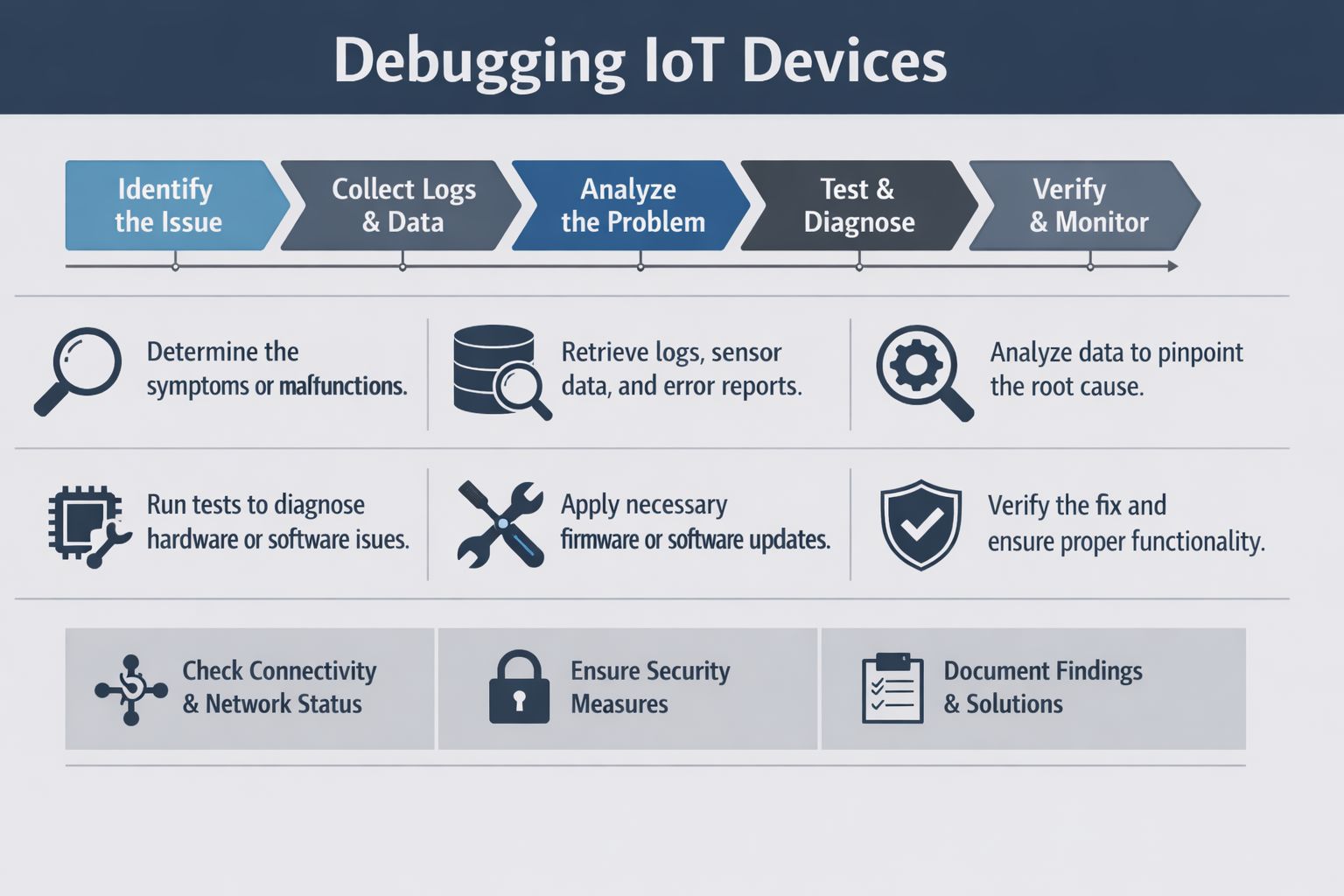
Given these complexities, a systematic, step-by-step framework is essential for effective IoT debugging. This framework can be broadly categorized into several key stages:
- Identify the Issue: Clearly define the problem.
- Collect Logs & Data: Gather relevant diagnostic information.
- Analyze the Problem: Pinpoint the root cause.
- Test & Diagnose: Validate potential solutions.
- Verify & Monitor: Ensure the fix is effective and durable.
Within these stages, several critical activities and considerations are crucial for success.
1. Identify the Issue: Defining the Problem
The first and most critical step in any debugging process is to thoroughly understand and precisely define the problem. This might seem obvious, but in complex IoT systems, symptoms can be misleading, and the root cause can be far removed from the observed malfunction.
Determine the Symptoms or Malfunctions
Start by meticulously documenting everything that is going wrong. Ask probing questions:
- What exactly is happening? (e.g., “device is offline,” “sensor reading is incorrect,” “data sporadically stops flowing,” “device is draining battery quickly”)
- When did it start? (e.g., “after a firmware update,” “after deploying to a new location,” “intermittently for the past week”)
- Where is it happening? (e.g., “only on device type X,” “in a specific geographic region,” “in a certain network environment”)
- How often does it occur? (e.g., “continuously,” “intermittently,” “under specific conditions,” “once a day”)
- What is the expected behavior? (e.g., “device should send data every 5 minutes,” “LED should be green,” “motor should turn clockwise”)
- What has changed recently? (e.g., network configuration, firmware version, environmental conditions, nearby interference)
Gathering input from users, monitoring dashboards, and alert systems is crucial at this stage. Distinguish between a symptom and a potential cause. For example, a “device is offline” message is a symptom, while the cause could be a network issue, power failure, or a crashed firmware.
Scope the Problem
Once symptoms are clear, try to narrow down the scope of the problem.
- Is it affecting a single device, a group of devices, or all devices of a certain type?
- Is it isolated to a particular environment or network?
- Does it follow a specific pattern? (e.g., time of day, data payload size)
Scoping helps prioritize debugging efforts and prevents you from chasing phantom issues. If only one out of hundreds of devices is failing, the problem is likely localized. If all devices in a particular factory are failing, the issue might be network-wide or related to environmental interference.
Replicate the Issue (If Possible)
The ability to reliably reproduce a bug is invaluable. If you can replicate the issue in a controlled environment, you can more easily test hypotheses and verify fixes.
- Can you force the device into the problematic state?
- What steps are needed to trigger the malfunction?
- Are there specific input values or sequences that consistently lead to the problem?
Sometimes, replication is impossible, especially with intermittent bugs or those tied to specific real-world conditions. In such cases, detailed logging and monitoring become even more critical.
2. Collect Logs & Data: Gathering Diagnostic Information
Once the problem is identified, the next step is to gather all available diagnostic information. This includes logs, sensor data, error reports, and anything else that can shed light on the device’s operational state.
Retrieve Logs, Sensor Data, and Error Reports
Logs are often the first line of defense in debugging. However, given the resource constraints of many IoT devices, logging strategies need to be well-thought-out.
Device-Side Logs
- Serial Console Logs: Many development boards expose a serial port (UART) that can provide raw output from the device’s firmware. This is often the most detailed and lowest-level source of information, critical during initial development and hardware bring-up.
- On-Device Storage Logs: If the device has sufficient flash memory, it can store logs locally. These logs might be accessible via a dedicated debug port, a file transfer protocol, or pushed to the cloud when connectivity is available. Implement a robust logging framework that handles log levels (DEBUG, INFO, WARN, ERROR, FATAL) and potential log rotation to prevent storage exhaustion.
- Real-time Debugging Interface: Tools like JTAG, SWD (Serial Wire Debug), or proprietary debug probes allow for real-time inspection of device memory, registers, and execution flow. These are indispensable for deep-firmware debugging, especially for issues like crashes, deadlocks, or unexpected hardware behavior.
Gateway Logs
- Network Gateway Logs: If your IoT solution uses a dedicated gateway (e.g., Raspberry Pi, industrial PC), its operating system and applications will generate logs. These can offer insights into device connectivity, data aggregation, protocol translation, and edge processing errors.
- Protocol Analyzers: For proprietary or complex local networks (e.g., Zigbee, Z-Wave, BLE meshes), protocol analyzers can capture raw network traffic between devices and the gateway, revealing communication failures or malformed packets.
Cloud-Side Logs
- Cloud Platform Logs: IoT cloud platforms (e.g., AWS IoT, Azure IoT Hub, Google Cloud IoT Core) provide extensive logging capabilities. These include device connection/disconnection events, message ingress/egress, authentication failures, rule engine errors, and service-specific logs. These are crucial for diagnosing connectivity and cloud-side processing issues.
- Application Logs: Backend applications that consume and process IoT data will also generate logs. These can highlight data parsing errors, database issues, or failures in downstream systems.
Sensor Data
- Historical Sensor Data: Anomalies in sensor readings (e.g., sudden spikes, constant values, missing data points) can indicate a faulty sensor, environmental interference, or a data processing issue. Analyze historical data trends for unusual deviations.
- Raw Sensor Data: Sometimes, the issue lies in the interpretation or calibration of sensor data. Accessing the raw, uncalibrated readings can help diagnose these problems.
Error Reports and Crash Dumps
- Firmware Crash Dumps: For devices running an RTOS or full OS, crash dumps (e.g., core dumps, stack traces) are invaluable. They provide a snapshot of the device’s memory and execution state at the time of a crash, helping to identify the exact line of code that caused the failure. Implement mechanisms to collect and report these dumps to your development team.
- Application Error Reports: Cloud applications and user-facing dashboards will generate their own error logs, which can be correlated with device and cloud-side data.
Ensure Comprehensive Data Collection Mechanisms
Designing your IoT system with debugging in mind means implementing robust data collection mechanisms from the outset.
- Centralized Logging: Establish a centralized logging system (e.g., ELK stack, Splunk, cloud-native logging services) to aggregate logs from devices, gateways, and cloud services. This provides a single pane of glass for analyzing distributed events.
- Monitoring and Alerting: Implement comprehensive monitoring for key device metrics (online/offline status, battery level, signal strength, CPU usage, memory usage, sensor readings) and cloud service health. Threshold-based alerts can proactively notify you of potential issues.
- Remote Diagnostics: Develop capabilities for remotely accessing device logs, restarting devices, or even reconfiguring them. This is critical for devices deployed in challenging or inaccessible locations.
- Time Synchronization: Accurate time synchronization (e.g., using NTP) across all devices, gateways, and cloud services is absolutely essential for correlating events and troubleshooting distributed issues effectively. Without synchronized timestamps, tracing events across different system components becomes incredibly difficult.
3. Analyze the Problem: Pinpointing the Root Cause
With a wealth of data in hand, the next phase involves careful analysis to pinpoint the actual root cause of the problem. This is often the most challenging part of debugging, requiring a blend of technical expertise, logical deduction, and sometimes, creative thinking.
Analyze Data to Pinpoint the Root Cause
Start by systematically reviewing the collected logs and data, looking for patterns, anomalies, and correlations.
Correlate Events
- Timestamp Alignment: Use synchronized timestamps to align events across different logs (device, gateway, cloud). For example, does a device disconnection event correlate with a spike in network latency or a cloud service error?
- Event Sequences: Trace the sequence of events leading up to the malfunction. Did a specific message precede an error? Did a particular command trigger an unexpected state?
- Contextual Analysis: Look for contextual clues. Was the device in a specific operational mode? Were environmental conditions unusual? Were there any concurrent system updates or changes?
Identify Anomalies
- Sudden Changes: Look for sudden changes in data patterns, such as a drop in sensor readings, an unexpected increase in network traffic, or a sudden rise in error rates.
- Out-of-Range Values: Are sensor readings outside of their expected operating range? Are system parameters (e.g., CPU temperature, battery voltage) abnormal?
- Missing or Duplicate Data: Are there gaps in data streams, or are duplicate messages being received? This can indicate connectivity issues or message processing errors.
Utilize Diagnostic Tools
- Log Parsers and Aggregators: Use tools to parse, filter, and search through large volumes of log data. Regular expressions, search queries, and visualization dashboards can help identify patterns quickly.
- Monitoring Dashboards: Leverage dashboards to visualize key metrics over time. These can immediately highlight deviations from normal behavior.
- Network Analyzers: Tools like Wireshark or built-in OS network diagnostic utilities can capture and inspect network packets, revealing low-level communication issues, protocol violations, or network congestion.
- Spectrum Analyzers: For wireless issues, a spectrum analyzer can help identify interference from other 2.4 GHz or 5 GHz devices, which might be disrupting Wi-Fi or Bluetooth communication.
- Oscilloscopes and Logic Analyzers: For hardware-level debugging, these tools are indispensable for inspecting electrical signals, communication interfaces (e.g., I2C, SPI, UART), and timing issues.
- Debugger (JTAG/SWD): For firmware-level issues, a hardware debugger allows you to step through code, inspect variable values, set breakpoints, and observe the processor’s state in real-time. This is crucial for identifying race conditions, memory corruption, or unexpected program flow.
Develop Hypotheses
Based on your analysis, formulate hypotheses about the root cause.
- “I suspect the device is losing connectivity due to poor Wi-Fi signal strength.”
- “The incorrect sensor readings appear to be caused by a recent firmware update that changed the calibration logic.”
- “The cloud function is failing because it’s receiving malformed JSON data from the device.”
Each hypothesis should be testable.
4. Test & Diagnose: Validating Solutions
With a strong hypothesis in hand, the next step is to design and execute tests to confirm or refute it, and then to apply and verify the proposed fix.
Run Tests to Diagnose Hardware or Software Issues
Isolate Components
- Divide and Conquer: If the system is modular, try to isolate the problematic component. Can you replicate the issue with only the device and a minimal configuration, bypassing the gateway or cloud?
- Substitute Components: If you suspect a hardware component (a sensor, a communication module), try swapping it with a known good one. This can quickly confirm a hardware fault.
Unit and Integration Testing
- Re-run Unit Tests: If the problem is suspected to be in the code, ensure all relevant unit tests are passing. Create new unit tests to specifically target the suspected faulty logic.
- Integration Tests: Verify that different software modules and hardware components interact correctly. Simulators or testbeds can be used to run integration tests in a controlled environment.
Specific Diagnostic Tests
- Connectivity Tests: Ping tests, traceroute, and network scans can verify basic network reachability. More advanced tests can measure latency, throughput, and packet loss.
- Sensor Calibration Tests: For sensor issues, re-run calibration routines or compare readings against a known accurate reference sensor.
- Power Consumption Tests: If battery drain is an issue, use a power analyzer to measure current consumption in different operational states (sleep, active, transmitting).
- Environmental Tests: If variables like temperature or humidity are suspected, try to reproduce the issue in an environmental chamber.
- Firmware and Software Version Control: Ensure you can easily roll back to previous stable versions of firmware or software. Comparing behavior between versions can often highlight the introduction of a bug.
Apply Necessary Firmware or Software Updates
Once the root cause is identified and a fix has been developed, it needs to be applied and tested.
- Firmware Over-the-Air (FOTA): For devices already deployed, FOTA is the primary mechanism for distributing firmware updates. Ensure your FOTA infrastructure is robust, supports delta updates (to save bandwidth), and has rollback capabilities. Before pushing to production, thoroughly test updates on a subset of devices or a staging environment.
- Software Updates: For gateway applications, cloud functions, or backend services, follow standard software deployment practices, including version control, staging environments, and gradual rollouts.
- Configuration Updates: Sometimes, the problem is a misconfiguration rather than a code bug. Ensure you have a secure and reliable way to remotely update device configurations.
Consider Hardware Refinements
In some cases, the issue might stem from a fundamental hardware design flaw. This is more complex to address, especially for already-deployed devices.
- Schematic and Layout Review: A thorough review of the electrical schematic and PCB layout can reveal potential issues like impedance mismatches, power supply noise, or signal integrity problems.
- EMI/EMC Testing: Electromagnetic interference (EMI) or electromagnetic compatibility (EMC) issues can cause erratic device behavior. Specialized testing is required to identify and mitigate these.
- Component Swap/Upgrade: If a specific component is deemed faulty or insufficient, a hardware revision might be necessary.
5. Verify & Monitor: Ensuring Long-Term Stability
Debugging doesn’t end when a fix is applied. The final, crucial steps involve verifying that the fix has indeed solved the problem and establishing continuous monitoring to prevent recurrence and ensure long-term system health.
Verify the Fix and Ensure Proper Functionality
After applying the fix, a rigorous verification process is essential.
- Re-Run Original Problem Scenarios: Attempt to reproduce the original problem. If it no longer occurs, that’s a positive sign.
- Execute Regression Tests: Ensure that the fix hasn’t introduced new problems or broken existing functionality. A comprehensive suite of automated regression tests is invaluable here.
- Monitor Key Metrics: Closely observe the relevant device and system metrics for a period after the fix is deployed. Look for a return to normal behavior, stable sensor readings, consistent connectivity, and absence of error messages.
- User Feedback: If applicable, solicit feedback from users or stakeholders who initially reported the issue.
- Long-Term Observability: Ensure that the improved logging and monitoring capabilities remain in place, providing continuous visibility into the system’s performance.
Check Connectivity & Network Status
Given the heavy reliance on networks, verifying connectivity post-fix is paramount.
- Signal Strength and Quality: Confirm that devices have adequate signal strength and quality for their respective networks (Wi-Fi, cellular, LoRaWAN). Low signal can lead to dropped packets and intermittent connectivity.
- Network Latency and Jitter: Analyze latency between devices, gateways, and the cloud. High latency or jitter can disrupt real-time applications.
- Packet Loss: Monitor for packet loss, which can indicate network congestion, interference, or faulty network hardware.
- IP Address and Port Status: Verify that devices are receiving correct IP addresses and that necessary ports are open and accessible.
- DNS Resolution: Ensure devices can correctly resolve domain names for cloud endpoints.
- Firewall Rules: Confirm that no firewall rules (on the device, gateway, or cloud) are blocking legitimate traffic.
Ensure Security Measures
Security is not a static state; it’s an ongoing process. Debugging should always include a security verification aspect, especially after changes are introduced.
- Authentication and Authorization: Verify that devices are properly authenticating to the network and cloud services, and that authorization rules are correctly enforced.
- Encryption Verification: Confirm that all sensitive data in transit and at rest is correctly encrypted. Check TLS/SSL handshake logs for errors or protocol downgrades.
- Firmware Integrity: Implement checks to ensure the integrity of the running firmware. This often involves secure boot mechanisms and cryptographic signatures.
- Vulnerability Scanning: Regularly scan devices and cloud infrastructure for known security vulnerabilities.
- Access Controls: Review access logs to identify any unauthorized access attempts or suspicious activity.
- Principle of Least Privilege: Ensure that devices and services only have the minimum necessary permissions to perform their functions.
- Secure Coding Practices: Continuously audit firmware and software for common security vulnerabilities (e.g., buffer overflows, injection flaws).
Document Findings & Solutions
Comprehensive documentation is not just good practice; it’s a critical component of maintainability, scalability, and knowledge transfer for complex IoT systems.
- Problem Description: Clearly describe the original problem, including symptoms, frequency, and impact.
- Root Cause Analysis: Detail the investigation process, the analysis performed, the hypotheses tested, and the identified root cause.
- Solution Implemented: Describe the exact fix, including version numbers of firmware, software, configuration changes, or hardware modifications.
- Verification Steps: Document how the fix was verified and the results of the verification.
- Lessons Learned: Capture any insights gained, best practices identified, or process improvements suggested by the debugging effort.
- Knowledge Base: Store this documentation in a central, accessible knowledge base (e.g., wiki, confluence, internal ticketing system) so that others can benefit from it, reducing future debugging time.
- Runbooks and Playbooks: For recurring issues or common operational problems, create runbooks that provide step-by-step instructions for diagnosis and resolution.
Continuous Monitoring and Proactive Maintenance
True resilience in IoT comes from continuous monitoring and proactive maintenance.
- Telemetry and Metrics: Instrument your devices and cloud services to collect comprehensive telemetry data (performance metrics, health status, error counts).
- Anomaly Detection: Implement machine learning or statistical anomaly detection algorithms to automatically flag unusual patterns in data that might indicate an impending failure.
- Predictive Maintenance: Use gathered data to predict component failures or performance degradation before they impact operations.
- Automated Remediation: Where possible, design systems to automatically detect and remediate common issues (e.g., a device reboot if it detects it’s offline for too long).
- Regular Audits: Periodically audit your IoT deployments for security vulnerabilities, configuration drift, and performance bottlenecks.
- Scaling and Load Testing: Regularly test the system’s ability to handle increasing loads and device counts to uncover potential scalability bottlenecks before they become production problems.
Advanced Debugging Techniques and Considerations
As IoT systems evolve, so too must debugging strategies. Here are some advanced techniques and considerations for complex debugging scenarios:
Remote Debugging Capabilities
For devices in challenging environments, remote debugging is a lifesaver. This involves:
- Remote Console Access: Secure shells (SSH) or web-based consoles to access device command lines.
- Remote Log Retrieval: Mechanisms to push logs to the cloud or retrieve them on demand.
- Over-the-Air Debugging: Some advanced platforms allow for remote debugging sessions, where a debugger on a developer’s workstation can attach to a remote device over the network.
- Cloud-Native Debugging Tools: Leverage cloud provider-specific tools for debugging serverless functions, containerized applications, and distributed services.
Digital Twins for Debugging
A digital twin – a virtual replica of a physical device or system – can be an incredibly powerful debugging tool.
- Simulation: Test scenarios and replicate bugs in a simulated environment without impacting physical devices.
- State Mirroring: Observe the real-time state of a physical device through its twin, providing a rich, contextual view of its operation.
- Predictive Analysis: Use the twin to model potential failure modes and test remediation strategies.
AI/ML for Anomaly Detection and Root Cause Analysis
As the volume of IoT data grows, manual analysis becomes impractical.
- Anomaly Detection: Machine learning algorithms can learn normal behavioral patterns and flag deviations that indicate potential issues.
- Predictive Analytics: AI can analyze historical data to predict device failures or performance degradation, allowing for proactive maintenance.
- Automated Root Cause Identification: In some cases, AI can even suggest potential root causes by correlating complex patterns across vast datasets.
Fuzz Testing and Stress Testing
Beyond functional tests, these techniques help uncover edge cases and robustness issues.
- Fuzz Testing: Provide random, malformed, or unexpected inputs to devices and systems to uncover vulnerabilities and unexpected behaviors.
- Stress Testing: Subject devices and the overall system to extreme loads (e.g., high data rates, large numbers of concurrently connected devices) to identify performance bottlenecks and stability limits.
Understanding Protocol Stacks
Deep debugging often requires an intimate knowledge of the networking protocols involved.
- MQTT: Understand message formats, QoS levels, retained messages, and last will and testament.
- CoAP: Grasp its lightweight nature, observe options, and resource discovery.
- HTTP/HTTPS: Standard web protocols for cloud communication.
- Low-Power Wireless Protocols (LoRaWAN, NB-IoT, Sigfox): Familiarize yourself with their duty cycles, message size limitations, and network architecture.
- Device-Specific Protocols: Many IoT devices utilize proprietary protocols or variations.
Ethical Considerations and Data Privacy
While debugging, ensure you adhere to privacy regulations and ethical guidelines. Accessing sensitive data, even for debugging purposes, must be done with appropriate authorization and safeguards. Anonymize or redact personal identifiable information (PII) wherever possible in logs and diagnostic data.
The Business Imperative of Effective IoT Debugging
Debugging IoT devices is not merely a technical exercise; it has significant business implications.
Ensuring Business Continuity
System failures in IoT can directly impact business operations, leading to downtime, productivity losses, and financial repercussions. Effective debugging minimizes these outages, ensuring that critical processes remain operational. For example, in an industrial setting, a malfunctioning sensor on a production line can halt manufacturing, costing thousands per hour.
Protecting Revenue and Reputation
Malfunctioning IoT devices can lead to poor customer experiences, product returns, and damaged brand reputation. In critical applications like healthcare or autonomous vehicles, failures can have life-threatening consequences. Robust debugging processes contribute directly to product quality and customer satisfaction.
Optimizing Operational Costs
Inefficient debugging can be incredibly costly in terms of engineering hours, field service visits, and wasted resources. By adopting a structured and systematic approach, companies can reduce the time and expense associated with identifying and resolving issues. Proactive debugging and remote capabilities reduce the need for expensive truck rolls.
Accelerating Time to Market
Reliable debugging shortens development cycles. When developers can quickly identify and fix bugs, products move from concept to deployment much faster, giving businesses a competitive edge.
Enhancing Scalability
A well-debugged and stable IoT system is inherently more scalable. When issues are thoroughly addressed, the system can grow in size and complexity without being plagued by recurring or elusive bugs. This allows businesses to expand their IoT deployments with confidence.
Enabling Innovation
Reliable and maintainable IoT systems free up engineering teams to focus on innovation rather than constantly firefighting. When the foundational elements are stable, developers can explore new features, technologies, and applications, driving future growth.
Conclusion
Debugging IoT devices is undoubtedly a complex undertaking, demanding a blend of hardware, software, network, and cloud expertise. However, by adopting a structured, multi-layered approach – one that prioritizes issue identification, comprehensive data collection, meticulous analysis, rigorous testing, continuous verification, and diligent documentation – engineers and organizations can transform this challenge into a core competency. This systematic framework not only resolves immediate technical malfunctions but also builds more reliable, scalable, secure, and maintainable IoT ecosystems.
In the rapidly evolving world of interconnected devices, the ability to effectively debug is paramount to the success of any IoT initiative. It’s the difference between a faltering deployment and a thriving, value-generating solution. Embrace these strategies, and you’ll be well-equipped to navigate the intricacies of the IoT landscape, ensuring your innovations deliver on their promise.
Ready to Conquer Your IoT Debugging Challenges?
At IoT Worlds, we understand the complexities of modern IoT deployments. Our team of expert engineers specializes in designing, implementing, and maintaining robust IoT solutions, including advanced debugging and monitoring strategies. Whether you’re struggling with elusive hardware bugs, intermittent connectivity issues, or cloud integration challenges, we have the expertise to help you build and maintain a reliable, scalable, and secure IoT ecosystem.
Don’t let debugging impediments hinder your IoT success. Reach out to us today to learn how our tailored services can empower your projects.
Send an email to info@iotworlds.com and let’s discuss how we can help you achieve your IoT goals.
